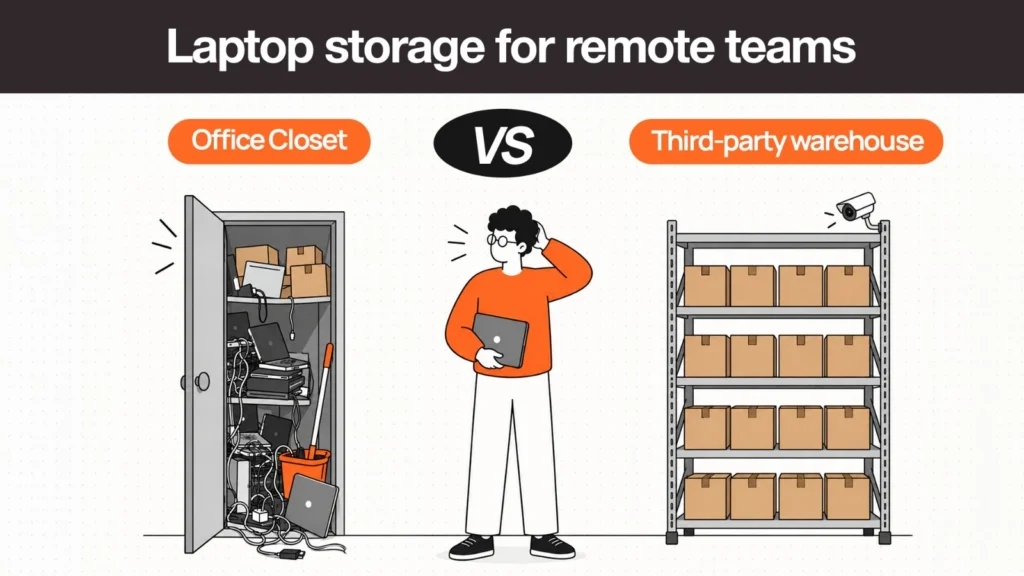
A company has 20 laptops sitting in a closet at headquarters. Nobody is entirely sure which ones are ready to ship to a new hire, which belong to employees who left months ago, which need a repair before they go anywhere, and which have quietly been written off and forgotten.
This is a more common situation than most IT teams would like to admit, and it points to a question that doesn’t have an obvious answer: should those devices stay in the office, or should they move to a third-party warehouse? Laptop storage for remote teams isn’t really about square footage. It’s about how securely, efficiently, and visibly a company can hold devices between the moments they matter — procurement, assignment, offboarding, and redeployment.
What Is Laptop Storage, and Why Does It Need a Real Decision?
Laptop storage is wherever a company holds devices that aren’t currently assigned to an active user — whether that’s a closet, a dedicated storage room, or a third-party device warehouse. For a fully in-office company, this barely counts as a decision. For a distributed team, it becomes one of the more consequential logistics choices in the entire device lifecycle. The right model depends on fleet size, workforce distribution, how often people join and leave, whether IT has the capacity to handle logistics, and how much visibility the company currently has into its own inventory.
Storage Is a Lifecycle Stage, Not a Destination
Most discussions treat storage as a static question — where do laptops sit. That misses the more useful framing. A laptop enters storage for a specific reason, and that reason tells you what needs to happen next. Devices typically land in storage because they were purchased ahead of a start date, retrieved after an employee left, held as an emergency spare, or waiting on a redeployment decision.
Seen this way, storage sits in the middle of a longer sequence: procure → deliver → assign → retrieve → inspect → store → redeploy → retire. A storage model that doesn’t account for what comes before and after it will always struggle, regardless of how well-organized the physical space is. Our guide to device lifecycle management covers the full sequence.
Office Closet Storage: What It’s Good For and Where It Breaks Down
Where it works well
For a small team concentrated in a single location, an office closet has real advantages. There’s no incremental storage fee. Access is immediate. It’s simple to set up, requires no vendor relationship, and works well when IT staff are already onsite.
Where it breaks down
The limitations show up as the company grows or spreads out. Physical space is finite. Inventory tends to be tracked manually, labeling becomes inconsistent the moment more than one person is responsible for it, and devices get forgotten — especially ones that came back from an offboarded employee and were never logged. Security is only as good as whoever locks the closet, and there’s rarely a documented chain of custody. The model simply doesn’t scale with distribution.
Third-Party Warehouse Storage: What It Adds and What It Costs
What it adds
A third-party warehouse, when it’s a good one, brings dedicated physical security, structured asset-level inventory tracking, controlled access, and capacity that scales without the company needing more office space. Because these providers often operate regionally, they can position inventory closer to where distributed employees actually are — shortening delivery time to new hires and simplifying retrieval from departing ones.
What it costs
None of this is free. Handling fees, shipping fees, and provider dependency are all real considerations. Physical access is no longer immediate — retrieving a specific device for an urgent need means a request and a shipment rather than a walk down the hall. See our guide to the true cost of laptop retrieval for the full picture of what these operational costs add up to.
The Hybrid Model: A Middle Path Most Companies Overlook
Few companies need to choose one model exclusively. A hybrid approach — a small onsite emergency pool at headquarters combined with a larger reserve fleet in third-party or regional storage — fits a lot of real-world situations better than either extreme. In practice, this might look like keeping five or six spare laptops at HQ for same-day emergency replacement, while the bulk of the reserve fleet sits in regional storage closer to where distributed employees are located. Retrieved devices go into regional storage rather than being shipped back to headquarters by default, and redeployment happens directly from that regional inventory to the next nearby hire.
Office Closet vs. Warehouse vs. Hybrid: A Direct Comparison
| Factor | Office Closet | Third-Party Warehouse | Hybrid |
| Direct storage cost | No incremental fee | Monthly storage + handling fees | Lower than full outsourcing |
| Internal IT labor | Higher — manual tracking | Lower — provider handles it | Moderate — split model |
| Physical space | Requires office space | None required internally | Small onsite pool only |
| Inventory visibility | Often weak | Can be strong, provider-dependent | Depends on unified system |
| Physical security | Depends on internal controls | Often stronger, varies by provider | Combination of both |
| Scalability | Limited by office space | Generally scales well | Scales for the outsourced portion |
| Remote deployment speed | Slow for distant employees | Fast if regional coverage exists | Fast regionally, immediate at HQ |
| Retrieval / redeployment | Manual, often inconsistent | Streamlined, provider-dependent | Streamlined remotely, manual locally |
| Geographic reach | Single location | Multiple regions | Broad with a local option |
| Emergency access | Immediate | Request-based, slower | Immediate at HQ, slower elsewhere |
| Best suited for | Small, single-location teams | Distributed teams, frequent movement | Central HQ + distributed workforce |
Related Reads
If you know which direction you’re heading, these guides go a level deeper on each stage:
- Laptop Lifecycle Management: The Complete Guide — where storage sits in the full device lifecycle.
- Where Do Retrieved Laptops Actually Go? Inside a Device Warehouse — intake, wiping, grading, and routing once a device enters storage.
- How Many Spare Laptops Should You Keep? — sizing the onsite emergency pool so it stays proportionate.
- Laptop Retrieval Cost: What Businesses Really Pay — the true cost comparison between in-house and third-party handling.
- Laptop Redeployment: How to Reuse Devices Instead of Rebuying — what happens after a device leaves storage.
- Remote Device Offboarding: The Complete Guide — the retrieval-to-storage workflow for departing employees.
A Decision Framework for Choosing Your Storage Model
Choose office storage when:
- The fleet is small and employees are concentrated in one location
- Device turnover is low
- IT has the capacity to manage it manually
- The storage space is genuinely secure
- Devices are frequently needed onsite rather than shipped
Choose third-party storage when:
- The workforce is distributed across multiple regions or countries
- Devices regularly move between locations
- IT has limited capacity for logistics work
- Offboarding and retrieval need a repeatable, scalable process
- Storage needs to scale without expanding office space
Consider a hybrid model when:
- There’s a central office but a genuinely distributed workforce
- Fast, local access to a small number of emergency devices matters
- Most of the fleet doesn’t need to be onsite day to day
- The company operates across multiple regions but still has a meaningful home base
What to Look for in Storage Security
“Secure storage” means very little on its own. For a third-party provider, ask specifically about controlled physical access, asset-level identification, a documented chain of custody for each device, surveillance or other physical security controls, insurance coverage, and documented handling procedures rather than informal practice.
On data sanitization: NIST SP 800-88 Rev. 2 (September 2025) is the current reference framework, superseding Rev. 1. It shifts toward establishing an organizational sanitization program rather than prescribing a single method. For tools that support this process, see our guide to the best data destruction and device disposal tools.
Retrieval, Storage, and Redeployment as One Workflow
The value of storage comes almost entirely from what happens after a device enters it, not from the storage itself. For a remote employee, the sequence looks like this: the employee leaves, the device is retrieved, its condition is checked, data is securely wiped, the inventory record is updated, the device is stored, a new employee is eventually assigned, and the device ships out again.
Treated as a single connected workflow, this sequence keeps a retrieved device moving toward its next useful assignment. Treated as disconnected steps — handled by different people, tools, or vendors with no shared record — it produces exactly the scenario from the opening: a closet full of devices nobody can account for with any confidence.
How Remoasset Handles Storage as Part of the Laptop Lifecycle
Storage doesn’t need to become another disconnected operational silo. Remoasset treats storage as one stage inside a single lifecycle: procurement, delivery, asset tracking, maintenance and repairs, retrieval, storage, secure data wiping, and redeployment all sit on the same platform and the same asset record.
For a distributed team, that connection matters more than the storage location itself. A device retrieved from a departing employee in one country can move into regional storage, be wiped and inspected, and become available for redeployment to the next hire in that region — without handoffs between separate vendors and spreadsheets that cause devices to go untracked. Remoasset supports this across more than 80 countries with local retrieval and regional storage. Book a demo to see the workflow in practice.
FAQs
Where should companies store laptops for remote employees?
It depends on fleet size and distribution. Small, single-location teams can manage with office storage. Distributed teams generally benefit from regional or third-party storage that positions devices closer to where employees actually are.
Is it better to store laptops in an office or a warehouse?
Neither is universally better. Office storage is simpler and cheaper for small, concentrated teams. Third-party warehouse storage scales better for distributed teams but adds handling and shipping costs that need to be weighed against the overhead of managing storage manually.
What is IT asset warehousing?
IT asset warehousing is the practice of storing company hardware in a dedicated facility — typically operated by a third party — rather than in an office. It’s often paired with inventory tracking, inspection, data wiping, and redeployment coordination.
How should unused company laptops be stored?
Unused laptops should be inventoried with a clear record of condition and status, stored securely with controlled access, and tied to a documented next step — redeployment, repair, resale, or recycling — rather than sitting indefinitely with no assigned purpose.
How do companies track laptops in storage?
Most companies use an asset management system that records each device’s serial number, model, location, condition, and status. The key is keeping that record updated automatically as devices move, rather than relying on periodic manual audits.
What happens to laptops after remote employees leave?
Ideally, the device is retrieved, inspected, securely wiped, and routed to storage for redeployment — or to repair, resale, or recycling if it’s no longer suitable for reuse. How quickly and consistently this happens determines how much value the company recovers.
Should companies store returned laptops or ship them to headquarters?
For distributed teams, shipping every returned laptop back to a central headquarters is often unnecessary and expensive. Storing devices regionally — closer to where the next employee who needs one is likely to be — is usually more efficient.
When does third-party IT asset storage make financial sense?
It tends to make sense once a company’s fleet is large enough, or distributed enough, that internal IT labor, shipping costs, and lost visibility from managing storage informally start to outweigh the fees a third-party provider charges.
Can companies use a hybrid laptop storage model?
Yes. A common approach is keeping a small emergency pool onsite at headquarters for immediate needs, while storing the larger reserve fleet regionally or through a third-party provider closer to distributed employees.