

HR confirms ten new hires starting next month. Some need MacBooks. Others need Windows. One is a designer who needs 32GB RAM. Another is a support agent who just needs something reliable.
Buying Laptops Is Easy. Building a Procurement Process Isn’t.
The purchase order gets approved. And now IT has the actual work: figuring out which models to order, waiting on delivery, configuring each device, registering it in the asset system, and making sure it arrives before the employee’s start date.
Procurement doesn’t end when the budget is approved. It ends when a configured, registered laptop is in the right person’s hands on day one.
The Modern Laptop Procurement Process
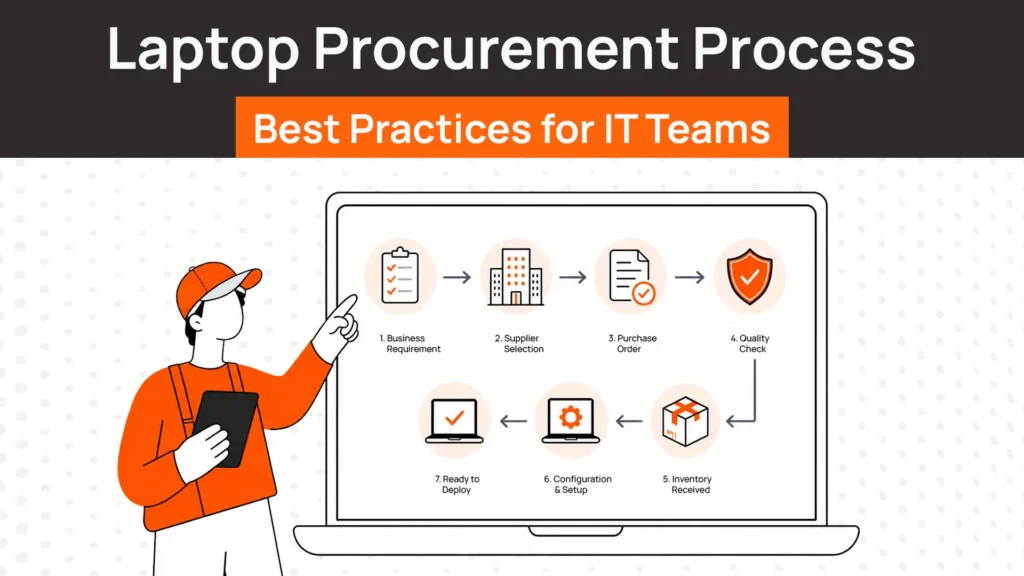
Before diving into best practices, here’s what a complete workflow looks like end to end.
| Stage | What Happens |
| Hiring request | HR confirms a new hire with role, start date, location |
| Device requirements | IT maps role to hardware spec (model, RAM, storage, OS) |
| Model selection | Choose from approved device list |
| Vendor confirmation | Confirm availability with approved supplier |
| Purchase approval | Finance approves the order |
| Order placement | IT places order with delivery timeline |
| Configuration | Device imaged with company apps, MDM enrolled |
| Delivery | Device shipped to employee location |
| Asset registration | Serial number, assignment, and status logged in ITAM |
| Employee onboarding | Employee receives device ready to use on day one |
Most procurement processes start at “purchase approval” and end at “delivery.” The first three and last two steps are where most IT teams lose time.
8 Best Practices for Laptop Procurement
Let’s take a look at some of the best laptop procurement practices IT management teams should follow.
1. Standardize Laptop Models
Supporting 12 different laptop models across 80 employees creates 12 different maintenance workflows, 12 sets of spare parts, and 12 configuration templates. Limit your approved list to 2-3 models across role categories: standard, performance, and executive.
Allow role-based exceptions by request, not by default. Standardization reduces procurement lead time, simplifies repairs, and makes redeployment easier when devices come back.
2. Choose Devices Based on Job Role
A developer running local containers and a customer success manager joining Zoom calls have very different hardware needs. Buying everyone the same mid-range laptop is a false economy. Engineers and designers typically need more RAM and processing power. Most other roles can run on a lighter, more affordable spec laptops for remove work.
Define 2-3 hardware tiers mapped to role types and use them consistently. This prevents both overspending and frustrated employees on underpowered machines.
3. Plan Procurement Before Hiring Starts
Laptops ordered after a hire is confirmed frequently arrive late. Supplier lead times run 5-15 business days, sometimes longer for custom configurations. Add shipping to a remote location and you’re easily at 3 weeks.
Work backwards from start dates. If hiring cycles are predictable, order ahead in small batches to keep ready-to-deploy inventory on hand. The request should trigger when an offer is extended, not when onboarding paperwork is signed.
4. Look Beyond Purchase Price
The cheapest laptop rarely stays cheapest over its lifecycle. A $900 device with a 1-year warranty will accumulate more repair costs, fail sooner, and require earlier replacement than a $1,300 device with a 3-year warranty. When evaluating hardware, factor in warranty coverage, expected useful life, repair availability, and refresh cycle cost. Total cost of laptop ownership over 3-4 years usually tells a different story than the invoice price.
5. Keep a Small Inventory of Ready-to-Deploy Devices
For companies with regular hiring, a small buffer stock eliminates procurement delays entirely. Keep 3-5 configured, asset-registered devices per major role type on hand. When a hire is confirmed, IT assigns from inventory and ships immediately.
Procurement then replenishes the stock without any urgency. This is especially useful for remote teams where shipping timelines are less predictable.
6. Standardize Approval Workflows
Unclear approval chains slow things down by a lot. A laptop request sitting in someone’s inbox for a week is a common but avoidable problem. Define who approves hardware requests, what information the request needs to include, and what the expected turnaround is.
For standard role-based models within budget, approval should be straightforward and fast. Exceptions (non-standard models, higher specs) can go through a separate workflow.
7. Connect Procurement with Onboarding
A laptop that arrives three days after a new hire’s start date creates a poor first impression and a productivity gap. IT and HR need to share timelines. HR should notify IT as soon as start dates are confirmed, not the day before. IT should track delivery against start dates and flag delays proactively. The goal is a device arriving configured and ready to use before the employee logs in for the first time.
8. Track Every Device from Day One
Asset registration shouldn’t happen weeks after deployment. Log the device in your ITAM system at the moment of purchase: serial number, model, purchase date, assigned cost center. Update status as it moves through configuration, shipping, and assignment.
A device that’s not in your system from day one becomes a gap in your inventory that’s hard to reconcile later, especially when it’s time for retrieval or refresh planning.
Common Laptop Procurement Mistakes
Most procurement problems don’t come from bad decisions. They come from skipped steps.
1. Buying the cheapest device instead of the right device
Low upfront cost often means higher repair frequency, shorter useful life, and more IT support overhead. Evaluate total cost over 3-4 years, not just the purchase price.
2. Supporting too many laptop models
Each model variation adds configuration, maintenance, and support complexity. Without a standardized list, procurement becomes inconsistent and inventories become fragmented.
3. Ordering laptops after hiring decisions are made
This is the most common reason for late device delivery. By the time approvals go through and the device ships, the employee has already started. Build procurement lead time into the hiring process, not after it.
4. Forgetting about repairs and refresh cycles
Procurement doesn’t end after purchase. Devices will need battery replacements, screen repairs for your laptop, and eventual refresh. If these aren’t planned for, IT ends up in reactive mode, spending more and delivering slower.
5. Treating procurement as a one-time transaction
The device you procure today will need to be tracked, maintained, retrieved, and eventually redeployed or retired. Procurement decisions (model choice, vendor, warranty terms) affect all of these stages. Think about the full lifecycle when you’re making the purchase.
Laptop Procurement Checklist
Use this before every procurement cycle.
| Step |
| Role and hardware requirements confirmed |
| Approved device model selected |
| Delivery timeline checked against start date |
| Budget and approval confirmed |
| Order placed with vendor |
| Configuration template applied (OS, MDM, apps) |
| Device asset registered in ITAM system |
| Shipping tracked with delivery confirmation |
| Employee confirmed receipt and setup |
Why Procurement Doesn’t End After the Purchase
Buying the laptop is only one part of the process. Once the device is in an employee’s hands, IT still owns it through its full lifecycle.
That means configuration and deployment from day one. Maintenance and repairs over the following years. Retrieval when the employee leaves. And either redeployment to the next hire or retirement through ITAD.
A procurement decision made without thinking about the rest of the lifecycle creates problems downstream. A device without a warranty. A model that’s hard to repair. A vendor who doesn’t support bulk returns. These things matter long after the purchase order is closed.
Good procurement sets up the rest of the lifecycle to run smoothly. A bad one creates issues at every stage that follows.
How RemoAsset Simplifies Laptop Procurement
A structured procurement process gets devices to employees on time. What happens after that is where most IT teams lose control.
RemoAsset manages what comes after purchase: deployment logistics to employees anywhere globally, asset registration from day one, maintenance and repair coordination, retrieval when employees leave, and redeployment of returned devices back into available inventory.
When procurement, deployment, and lifecycle management are connected in one system, IT teams stop firefighting. Devices move through each stage with visibility and without manual coordination at every step.
FAQs
How long should the laptop procurement process take?
For standard role-based models from approved vendors, 5-10 business days from request to delivery is achievable domestically. International shipping to remote employees adds time depending on location and customs. Keeping a small buffer inventory eliminates lead time entirely for most standard hires.
Should IT teams standardize on one laptop model?
Not necessarily one, but few. Two to three models covering standard, performance, and executive tiers is the practical target. Single-model standardization can work for small teams with homogeneous roles but rarely scales to diverse workforces.
How many spare laptops should companies keep in inventory?
A starting point: 5-10% of headcount in ready-to-deploy inventory for teams with regular hiring. For companies with unpredictable hiring or high turnover, slightly higher. Too much inventory depreciates on the shelf. Too little creates delays.
Who should own laptop procurement — IT or HR teams?
IT should own the technical decisions: model selection, specifications, approved vendor list, and configuration. HR or finance should own the contracting and budget approval. When they’re separated without a clear handoff process, things fall through.
How often should companies refresh their approved laptop models?
Review the approved device list annually. Manufacturers update hardware yearly, and the models you approved 18 months ago may no longer be optimal or available. Refresh planning should align with your device lifecycle cycle, typically every 3-4 years.
What should be included in a laptop procurement policy?
Approved device models by role, hardware specification tiers, budget thresholds, approval workflow, vendor list, standard lead times, and configuration requirements. A good policy answers the question before someone has to ask IT.
What’s the difference between laptop procurement and laptop lifecycle management?
Procurement covers the purchasing and initial deployment of devices. Lifecycle management covers everything from that point forward: maintenance, repairs, retrieval, redeployment, and retirement.
How can companies reduce procurement delays?
The three biggest levers: order earlier in the hiring process, keep buffer inventory for common role types, and simplify approval workflows for standard requests. Most delays come from late requests and slow approvals, not vendor lead times.




































































































