
Your IT team has a spreadsheet. Or a basic asset tracking tool. You know who has each laptop, the serial number, and when the warranty expires.
But things still go wrong.
A new hire starts Monday. Nobody ordered their laptop two weeks ago. An employee in Dublin quits. IT sends an email asking for the device back. Three months later, it’s still at their apartment. A batch of laptops is due for refresh but nobody flagged it in time. Finance is asking why you ordered 20 new devices when 15 are sitting in storage.
Here’s the thing: you’re not failing because you lack data. You’re failing because knowing where laptops are is different from managing what happens to them.
That’s the gap between laptop asset management and laptop lifecycle management and understanding it changes how you build your IT operations.
Laptop Asset Management vs Laptop Lifecycle Management at a Glance
The difference becomes clearer when you look at what each approach is actually designed to solve.
| Category | Laptop Asset Management | Laptop Lifecycle Management |
| Primary Goal | Know what you own and where it is | Manage what happens to devices from procurement to retirement |
| Focus | Inventory and record-keeping | Operational workflows and device transitions |
| Answers | “Where is this laptop? Who has it?” | “What’s happening to this device at every stage?” |
| Procurement | Records purchase after it happens | Plans and initiates procurement based on forecasting |
| Deployment | Logs device as deployed | Manages configuration, shipping, and delivery to employee |
| Maintenance | Tracks warranty status | Coordinates proactive repairs and replacements |
| Repairs | May log incidents | Manages repair workflows and loaner devices |
| Retrieval | Notes device as returned | Triggers and tracks retrieval process from departing employees |
| Asset Tracking | Core function | Part of a larger operational system |
| Best For | Small teams, stable environments, low device movement | Remote teams, growing companies, frequent onboarding/offboarding |
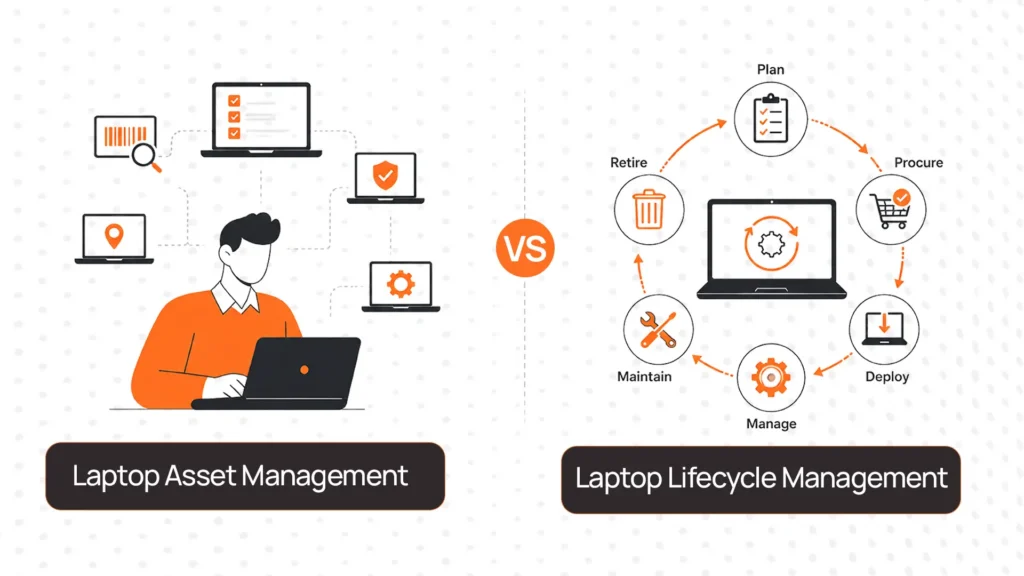
The core difference: asset management tells you where the laptop is. Lifecycle management helps you manage everything that happens to the laptop, from the moment it’s ordered to the moment it’s retired.
If your team is constantly firefighting device issues despite having accurate inventory, you’ve outgrown asset management.
What Is Laptop Asset Management?
At first glance, these two terms sound almost identical, so it’s worth being precise about what each one actually does.
Laptop asset management is the practice of tracking and recording information about the devices you own. This typically includes:
- Device inventory tells you what laptops you have, by model and quantity
- Ownership records you who each device is assigned to
- Serial numbers and purchase dates
- Warranty expiry tracking
- Basic location or assignment status
It answers audit-ready questions: how many laptops do we own, where are they, and when do warranties expire?
Asset management is valuable. It’s the foundation of any organized IT program. But it’s a passive system. It records what exists, not what needs to happen next.
What Is Laptop Lifecycle Management?
Laptop lifecycle management handles the complete operational journey of a device from the moment procurement is triggered through retirement. It includes:
- Procurement: Ordering devices based on headcount forecasting and refresh schedules
- Deployment: Configuring, shipping, and delivering devices to employees anywhere
- Maintenance: Proactive repairs, software updates, battery replacements
- Retrieval: Recovering devices from departing employees systematically
- Redeployment: Refurbishing returned devices for the next hire
- Retirement: Data wiping, recycling, or ITAD when devices reach end of life
Lifecycle management doesn’t replace asset management, instead it extends it. Asset records feed into workflows. But lifecycle management adds the operational layer that makes devices actually move through their journey without manual chaos.
Why Remote Teams Often Outgrow Basic Asset Management
Remote work is where asset management starts showing its limits. Tracking inventory is manageable when everyone works in one office. It breaks when devices are scattered across 20 countries.
Onboarding remote employees
Asset management records that a laptop was ordered. It doesn’t ensure the right device gets configured and shipped to an employee in Manila before their start date. One step without the other means employees wait days to work.
Retrieving devices from departing employees
An asset tracker notes a device is “unassigned” after an employee leaves. It doesn’t coordinate prepaid shipping, send automated reminders, or track the device back. That’s lifecycle management and without it, devices disappear.
Planning refresh cycles
Asset management tells you when warranties expire. Lifecycle management uses that data to trigger procurement, forecast budgets, and ensure refreshed devices reach employees before old ones fail.
Handling repairs and replacements
When a device breaks in Toronto, asset management logs a ticket. Lifecycle management ships a loaner, coordinates the repair, and updates inventory status. All without manual intervention.
These aren’t edge cases. They’re daily operational realities for remote IT teams.
When Laptop Asset Management Is Enough
Not every company needs lifecycle management and it’s worth being honest about that.
1. Small teams under 25 employees
At this scale, device movement is limited. Most employees stay for years. Onboarding happens a few times a year. A spreadsheet or basic asset tracker covers what you need. The operational overhead of a lifecycle platform exceeds the value it provides.
2. Single-office environments
When employees come to the office and IT can hand-deliver devices, the logistics complexity of management isn’t necessary. You can track devices, manage repairs in-person, and handle departures without shipping coordination.
3. Companies with minimal device movement
If your workforce is stable, turnover is low, and devices don’t move often, asset management provides sufficient visibility without the complexity of full lifecycle management.
Practical takeaway: If you’re managing fewer than 25 devices with predictable patterns, start with asset management. Add lifecycle management when operational problems outpace what tracking can solve.
When Laptop Lifecycle Management Makes More Sense
On the other hand, certain situations make laptop management not just useful, but necessary.
1. Remote and distributed teams
Employees in multiple cities or countries can’t interact with IT in person. Every device transition from onboarding, repair, to retrieval requires coordinated logistics. Asset tracking without lifecycle workflows creates constant manual work and device losses.
2. Frequent onboarding and offboarding
High-growth companies or those with significant turnover need systematic processes. When 20 people join and 10 leave every month, manual coordination breaks down. Lifecycle management automates what would otherwise require daily firefighting.
3. Larger device fleets (50+ devices)
At scale, the cost of managing devices manually like lost hours, lost devices, delayed deployments exceeds the cost of lifecycle management platforms. The ROI becomes obvious fast.
4. Refresh planning and budget forecasting
If your finance team is asking when major hardware spends are coming, you need lifecycle data. Lifecycle management connects device age and condition to Remoasset laptop procurement lifecycle platform forecasting.
Practical takeaway: If you’re managing remote teams, experiencing frequent turnover, or struggling with device logistics at scale, lifecycle management is the right move.
A Simple Decision Framework
Before choosing between the two, it’s worth understanding what operational problems you’re actually trying to solve.
| If your situation is… | Consider… |
| Small team under 25 employees | Asset Management |
| Single office, low device movement | Asset Management |
| Mostly remote workforce | Lifecycle Management |
| Frequent onboarding and offboarding | Lifecycle Management |
| Managing 50+ devices | Lifecycle Management |
| Devices across multiple countries | Lifecycle Management |
| Minimal hiring or turnover | Asset Management |
| Need better refresh planning | Lifecycle Management |
| Struggling with device retrieval | Lifecycle Management |
| Stable team, long employee tenure | Asset Management |
Use this as a starting point. Most growing companies start with asset management and migrate to lifecycle management when operational problems compound beyond what tracking can fix.
How RemoAsset Helps Teams Manage the Full Laptop Lifecycle
For teams that have outgrown basic asset tracking, the question is finding a platform that handles the full operational workflow.
RemoAsset manages the complete device lifecycle in one system. When someone is hired, procurement and deployment trigger automatically through HRIS integration. Devices arrive configured and on time. When employees leave, retrieval workflows initiate without manual IT coordination through the return process.
Retrieved devices don’t sit idle. RemoAsset evaluates condition, manages refurbishment, and returns viable devices to available inventory for the next deployment. Finance teams get real-time visibility into device status across the fleet — deployed, in transit, in storage, in repair.
Book a call to see how you can manage your device lifecycle end to end.
FAQs
Is laptop asset management the same as laptop tracking?
Largely yes. Asset management typically includes tracking device location, assignment, serial numbers, and warranty status. It answers “what do we have and where is it?” It doesn’t manage the operational workflows around procurement, deployment, maintenance, or retrieval.
Does lifecycle management replace asset management?
No — it extends it. Lifecycle management uses asset data as its foundation and adds operational workflows on top. You need accurate inventory records to manage device transitions effectively. The two work together, not in opposition.
Can small businesses benefit from lifecycle management?
Yes, but the threshold matters. For teams under 25 with low turnover and minimal device movement, the complexity of lifecycle management often exceeds its value. For small companies with distributed employees or frequent hiring, lifecycle management pays off even at lower device counts.
How does lifecycle management help remote teams specifically?
Remote teams can’t interact with IT in person. Every device transition requires logistics coordination. Lifecycle management automates this coordination, ensuring devices reach employees on time and return when employees leave, without constant manual follow-up.
What happens after a laptop is retrieved?
In lifecycle management, retrieval is a transition. The device is inspected for condition, wiped of data, evaluated for refurbishment, and either added back to available inventory for redeployment or routed to ITAD or recycling. This is where significant cost savings happen versus always buying new.
When should a company move beyond spreadsheets?
When tracking devices in spreadsheets causes operational problems, it’s time to move on. That usually happens somewhere between 30-50 devices or when the team becomes distributed.
Does lifecycle management reduce laptop replacement costs?
Yes, significantly. Retrieved and refurbished devices redeployed to new hires cost $100-200 to prepare versus $1,500 for new purchases. Companies with systematic redeployment programs regularly reduce procurement spend by 20-40% by maximizing device reuse rather than defaulting to new purchases.
Can lifecycle management improve employee onboarding?
Directly. Lifecycle management connects HR hiring events to device procurement and deployment automatically. Instead of IT manually ordering laptops after receiving an onboarding request, procurement triggers when the hire is confirmed. Devices arrive configured on start date, not a week late.