A team member finishes their last day. Their laptop gets shipped back. It arrives at your office in decent shape. Battery holds charge. Screen is fine. No visible damage.
Now what?
Most IT teams default to one of two things: stick it in storage indefinitely, or route it to recycling. Both are usually the wrong answer.
The right decision depends on the device’s condition, its age, and what you actually need from it next. A two-year-old MacBook that came back clean isn’t a recycling candidate. It’s a $600 asset you can hand to your next hire.
Here is how to think through corporate laptop disposal properly.
Corporate Laptop Disposal Options at a Glance
Before deciding what to do with a returned device, it helps to understand the full range of options available and when each one makes sense.
| Disposal Option | Best For | Value Recovery | Data Security | When to Choose |
| Redeployment | Devices under 3 years old in good condition | Highest: no cost, full reuse | Wipe before reassignment | Device is functional and meets current spec requirements |
| Refurbishment | Devices with minor wear or component issues | High: extends useful life at low cost | Wipe as part of refurb process | Battery, keyboard, or SSD needs replacement before reuse |
| ITAD | Devices with resale value but no internal demand | Medium: cash recovery through remarketing | Certified data destruction included | Device is functional but not needed internally |
| Recycling | Devices beyond repair or with no remaining value | Minimal: material recovery only | Physical destruction of storage | Device is broken, obsolete, or repair cost exceeds value |
The biggest takeaway: recycling is the last step, not the first. In most cases, businesses recover significantly more value by redeploying or refurbishing laptops before recycling ever enters the picture.
Start With the Highest-Value Option
Most businesses approach disposal backwards. They ask “how do we get rid of this?” when they should be asking “what’s the best use we can still get from this?”
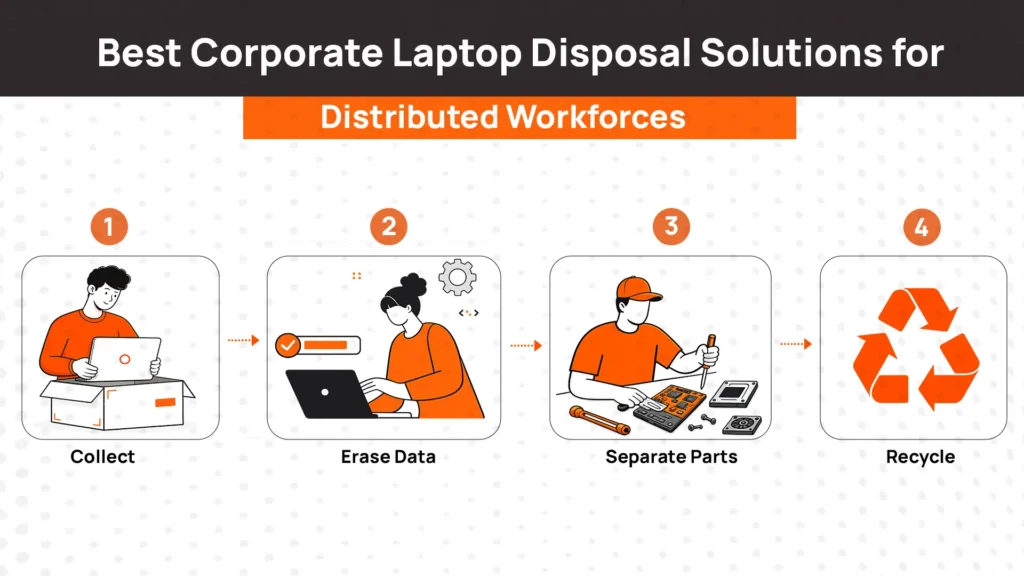
A simple disposal hierarchy helps:
- Redeploy the device if it is functional and meets your current configuration requirements. Clean it, wipe it, reimage it, and assign it to the next hire.
- Refurbish the device if it needs minor repairs. A battery replacement or SSD upgrade often costs $100 to $200 and adds two or more years of useful life.
- Send through ITAD if the device is functional but has no internal demand. An ITAD provider will wipe data, assess resale value, and recover cash where possible.
- Recycle only after the above options have been evaluated and ruled out.
Following this order means you are getting real value from devices rather than writing them off prematurely. For a company managing 50 to 100 devices, this distinction adds up to real money over time.
Option 1: Redeploy the Laptop
Redeployment is the highest-value outcome for any returned device, and it is also the simplest when done correctly.
A device ready for redeployment needs three things before it goes to the next employee: a secure data wipe, a fresh OS image with your current configuration, and a condition check to confirm it is fully functional.
This works best for devices under three years old that still meet your hardware requirements. A two or three year old MacBook or Dell XPS that came back in good shape can go directly back into inventory. When the next hire starts, it ships out configured and ready on day one.
The cost is minimal. Data wipe and reimage takes an hour. You avoid a $1,500 procurement order. For teams that retrieve devices consistently, this is where the biggest savings happen.
Option 2: Refurbish Before Reusing
Sometimes a device comes back functional but not quite ready to hand to someone new. That does not mean it should be retired. It usually means it needs a small amount of work.
The most common refurbishment tasks that make sense financially:
Battery replacement
Battery health is the most common reason a returned laptop feels unusable. A replacement costs $50 to $100 and fully restores portable use. For most laptops under four years old, this alone makes redeployment viable.
SSD upgrade
If the device is running slow or has insufficient storage for your current software stack, an SSD upgrade costs $60 to $120 and dramatically extends practical life.
Keyboard or port repair
A sticky keyboard or damaged charging port is fixable for $30 to $80. These are cosmetic and functional issues that affect day-to-day use but do not reflect the condition of the rest of the machine.
Physical cleaning
Dust, debris, and worn surfaces are not reasons to retire a device. A thorough clean makes the device feel professional. It matters when you are handing it to a new hire.
The decision rule is simple: if the total repair cost is below 40% of what a comparable refurbished device would cost, refurbish it.
Option 3: Use an ITAD Provider
ITAD becomes the right choice when a device is functional but you do not need it internally and it still has resale value.
An ITAD provider handles three things your team should not have to manage: certified data destruction, device assessment, and resale or remarketing.
Certified data destruction
ITAD providers follow NIST 800-88 standards for data erasure or physical destruction. Every device processed receives a certificate of data destruction with serial number, method used, and date. This is the documentation you need for compliance audits.
Remarketing and resale
Devices with remaining market value get assessed and sold through secondary channels. The proceeds often offset the cost of the ITAD service itself. A two year old Windows ultrabook may return $200 to $400. A MacBook in good condition can return more.
Documentation and reporting
ITAD providers give you an asset disposition report covering every device processed. This matters for financial tracking and compliance.
ITAD makes the most sense for batch retirements, devices coming off lease, or any situation where you have more functional devices than internal demand and need a trusted process for handling them.
Option 4: Recycle Responsibly
Recycling should be positioned as a final step, not a default.
It makes sense when a device is physically broken beyond economical repair, when the hardware is too old to meet your current software requirements, or when the ITAD assessment determines there is no resale value worth pursuing.
Responsible recycling means working with certified providers who follow documented processes for material recovery and make sure storage media is destroyed before equipment leaves your control. A certificate of recycling confirms the device was handled correctly.
What recycling should not be is the first thing you do with a returned laptop. If you send a functional two year old device to recycling, you are discarding real value.
How to Decide Which Disposal Option Is Right
The right decision usually comes down to three factors: device age, physical condition, and repair cost relative to value.
| Laptop Condition | Recommended Action |
| Under 3 years old, good condition | Wipe, reimage, and redeploy immediately |
| Minor repairs needed (battery, keyboard, SSD) | Refurbish and redeploy |
| Functional, good resale value, no internal demand | ITAD for remarketing |
| Significant damage, repair cost above 40% of replacement | Compare against refurbished replacement cost, likely ITAD or recycle |
| Over 5 years old, struggling with current software | ITAD if resale value remains, otherwise recycle |
| Physically broken beyond repair | Certified recycling after data destruction |
Print this table and put it next to wherever devices land when they come back. The answer for most returned devices is either redeployment or refurbishment.
Best Practices for Managing Laptop Disposal Across Remote Teams
Managing corporate laptop disposal across a distributed workforce adds logistics complexity, but the decisions themselves stay the same.
1. Retrieve devices quickly
The longer a device sits with a former employee, the more it depreciates and the harder retrieval becomes. Trigger retrieval workflows at the point of offboarding, not weeks later.
2. Inspect every returned device on arrival
Note serial number, physical condition, and any visible damage before anything else happens. This protects you in case of damage disputes and ensures the right disposal decision gets made.
3. Wipe data before anything else
No device should be assessed, stored, or transferred until data has been securely erased. This applies whether the device is being redeployed internally or sent to an ITAD provider.
4. Document every decision
Which devices were redeployed, which were refurbished, which went to ITAD, and which were recycled. Asset history matters for audits, insurance, and lifecycle planning.
5. Standardize the process
When different people are making disposal decisions differently, you get inconsistent outcomes. A documented workflow with the decision table above removes ambiguity and keeps the process consistent across your team.
How RemoAsset Helps Businesses Manage Laptop Returns
Good disposal decisions start well before a device reaches its end of life. They start with knowing where your devices are, retrieving them when employees leave, and understanding the condition of what comes back.
RemoAsset handles the infrastructure that makes this possible. When an employee leaves, retrieval workflows trigger automatically through HRIS integration. Devices are tracked from the employee’s location through return and inspection. Condition is logged on arrival. Redeployment-ready devices go back into inventory. Devices needing repairs are flagged and routed appropriately. Devices at end of life are identified with full context: age, condition, and history.
The result is that disposal decisions get made from information rather than guesswork. You are not writing off a two year old MacBook because nobody knew where it was or what condition it was in. You are making a deliberate call based on real data.
FAQs
Should every company laptop be recycled?
No. Most laptops returned from employees should be evaluated for redeployment or refurbishment before recycling is considered. Devices under four years old in working condition almost always have better options than recycling.
What is the difference between ITAD and recycling?
ITAD is a structured process covering certified data destruction, device assessment, resale or remarketing, and compliance documentation. Recycling breaks down materials for recovery. ITAD recovers financial value; recycling handles end-of-life disposal. ITAD typically includes recycling as a downstream step for devices with no resale value.
How do businesses decide whether to refurbish or replace a laptop?
Compare refurbishment cost against the cost of a comparable refurbished replacement. If repairs cost less than 40% of replacement cost and extend useful life by 12 months or more, refurbishment usually wins. If the device is over five years old or needs multiple major component replacements, replacement is likely the better call.
How long should companies keep employee laptops?
Most business laptops have a practical useful life of four to five years for standard roles. Heavy use roles may justify three year refresh cycles. Beyond five years, battery degradation, software compatibility issues, and security patch limitations make continued use less viable than replacement.
Can refurbished laptops be reassigned to new employees?
Yes, and this should be the default approach for functional returned devices. A refurbished, reimaged laptop given to a new hire costs $100 to $200 to prepare versus $1,500 or more to procure new. The experience for the employee is identical if the device is properly prepared.
What should businesses do before disposing of a laptop?
Inspect the device and document its condition. Perform a certified data wipe using NIST 800-88 compliant methods and generate a certificate of data destruction. Assess whether the device can be redeployed, refurbished, or sent to ITAD before routing to recycling.
How should remote companies manage returned laptops?
Use automated retrieval workflows triggered by HRIS offboarding events. Require prepaid return kits with tracking. Inspect and log every returned device on arrival. Maintain real-time inventory visibility so redeployable devices are identified and reused rather than forgotten in storage.
Is recycling always the most cost-effective option?
Rarely. Recycling recovers minimal value. Redeployment and refurbishment recover significantly more. Even ITAD typically returns cash through resale. Recycling is cost-effective only when the device has no remaining functional or market value.