

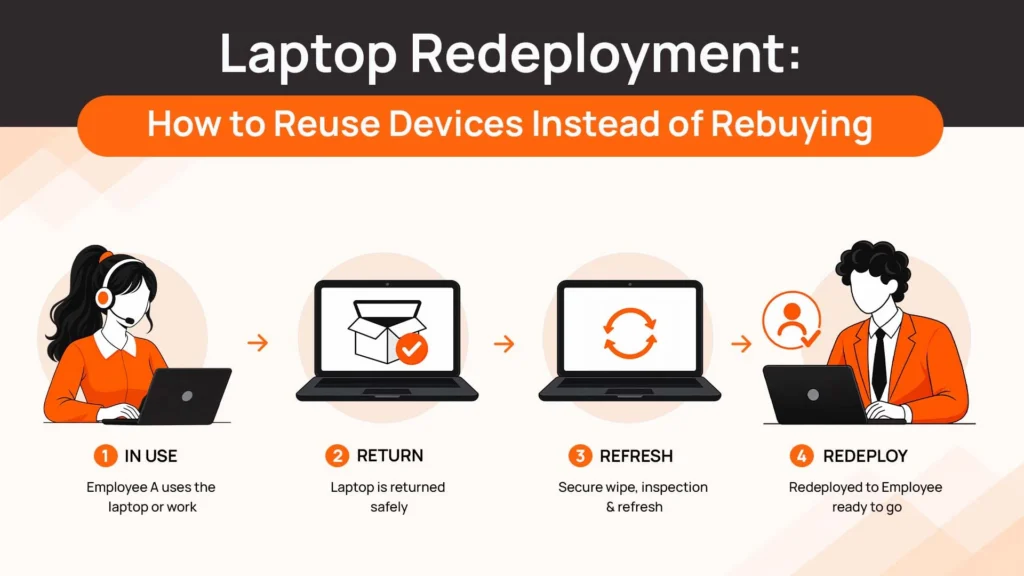
Every time an employee leaves, companies face a familiar hardware decision: what happens to the laptop they return? For many IT teams, the default answer is simple. Order a new laptop for the next employee and figure out what to do with the returned one later.
That approach is convenient, but it can be expensive.
A returned laptop may still have years of useful life left. With the right process for inspection, secure data wiping, grading and reassignment, that same device can become the next employee’s laptop instead of another purchase order. That is the idea behind laptop redeployment.
Redeployment isn’t simply about extending the life of old hardware. Done properly, it can reduce unnecessary procurement, improve asset utilization, create a buffer of ready-to-use devices and support more sustainable IT operations. The important question isn’t whether every returned laptop should be reused. It’s whether your organization has a process for identifying the ones that should.
Why “Just Order a New One” Is the Default
Ordering a new laptop is often the easiest decision an IT team can make. A new employee joins. IT selects the standard configuration, places an order, ships the device and closes the ticket. There is no need to determine whether another laptop is suitable. There is no need to inspect battery health, check cosmetic condition, verify specifications or coordinate a secure wipe. The problem is that the returned laptop doesn’t disappear. It ends up somewhere.
It might sit in a storage room. It might be sitting with a regional operations team. It might be waiting for someone to decide whether it’s still useful. Or it may already have been written off even though the hardware could have supported another employee. Over time, this creates two parallel problems. The company keeps buying new devices while usable devices remain idle, and the IT team gradually loses visibility into which equipment is actually available.
This is particularly expensive for organizations with frequent employee movement.
A laptop returned from a senior employee may not be appropriate for another engineer running demanding workloads. But it could be perfectly suitable for customer support, sales, operations or another role with lighter requirements. That is where redeployment becomes more useful than a simple “old versus new” decision.
What Actually Makes a Laptop Worth Redeploying?
Not every returned laptop deserves another assignment.
A good redeployment process isn’t about squeezing every possible month out of every device. It is about making a consistent decision based on condition, age, performance, security and the needs of the next employee.
Age and Remaining Useful Life
Start with the device’s age relative to your organization’s normal refresh cycle. A three-year-old laptop isn’t automatically obsolete. Its suitability depends on the hardware, operating system support, battery condition, workload and expected remaining service life. A device with sufficient performance and several useful years remaining may be a strong redeployment candidate. A laptop already approaching the end of its support or warranty period may make less sense, particularly if the cost of maintaining it is likely to exceed its remaining value.
The important point is to avoid using age as the only decision factor.
Physical Condition
Condition should be evaluated systematically.
Check the battery, display, keyboard, trackpad, ports, camera, speakers, charger and physical casing. A laptop with a minor cosmetic mark may be perfectly suitable for redeployment, while one with a degraded battery or damaged motherboard may not be economically sensible to repair. A simple grading system can help remove subjectivity.
For example:
| Grade | Typical Condition | Likely Action |
| A | Good condition, fully functional | Redeploy directly |
| B | Functional with minor wear | Redeploy after light refurbishment |
| C | Functional but requires meaningful repair | Compare repair cost with replacement value |
| D | Poor condition or uneconomical to repair | Resell, recycle or retire |
The exact grading criteria should reflect your organization’s hardware standards.
Performance Fit Matters
The most important question isn’t always, “Is this laptop good enough?”
It’s: “Is this laptop good enough for the next role?”
A high-performance laptop previously assigned to a developer may have more than enough capacity for a customer support employee.
Likewise, a standard business laptop used by an administrative employee may not be appropriate for a designer working with demanding creative applications. This creates an opportunity to match existing hardware to role-based specification standards instead of giving every new employee the same procurement treatment.
Data Sanitization Is Non-Negotiable
A laptop should never be redeployed simply because it powers on. Before another employee receives it, company data must be securely removed and the organization should have evidence that the sanitization process was completed.
NIST’s media sanitization guidance describes sanitization as a process intended to make access to data on storage media infeasible for a defined level of effort. NIST has since superseded SP 800-88 Rev. 1 with Rev. 2, so organizations should use the current guidance when defining their procedures.
This matters because redeployment transfers a device from one user to another. Without proper sanitization, the next employee could potentially inherit access to information belonging to the previous user. For that reason, secure wiping should happen before grading for reassignment, not after the laptop has already been allocated to someone else.
The Real Numbers Behind Laptop Redeployment
There is a useful real-world example from HubSpot.
In 2025, HubSpot reported that 2,672 laptops reached the end of their internal lifecycle. Of those, 2,140 were resold, meaning 81% of the outgoing hardware remained in productive use. HubSpot also reported approximately $985,000 in procurement cost avoidance from redeployment, representing about 525 devices that did not need to be newly purchased.
Those numbers should not be treated as a universal savings benchmark. An organization’s results will depend on its device mix, employee turnover, refresh policy, repair costs, resale market, geographic footprint and how effectively returned equipment is processed.
But the example demonstrates something important. Redeployment can move beyond sustainability language and become a measurable financial strategy.
If a company can satisfy a new hire’s hardware requirement with a device it already owns, it potentially avoids:
- The purchase of another laptop
- Procurement administration
- New-device shipping
- Initial configuration effort
- Some supply-chain delays
- The environmental impact associated with manufacturing another device
The financial case becomes especially interesting at scale. If 100 returned laptops are suitable for another assignment, the organization doesn’t necessarily need 100 new purchases. The savings aren’t created by buying cheaper hardware. They’re created by not buying hardware that isn’t needed. Because laptops depreciate steeply in their first two years, a device already in your fleet is almost always the cheapest capacity available to you.
A Simple Laptop Redeployment Workflow
A successful redeployment program doesn’t have to be complicated. It does, however, need to be consistent.
1. Return and Log the Device
The process starts when the laptop comes back from the employee. Record the asset identifier, model, serial number, assigned employee, return date and physical condition. Don’t leave the device sitting unrecorded while someone decides what to do with it. The sooner it enters the inventory workflow, the easier it is to maintain an accurate picture of available hardware.
This is also where a strong laptop asset management process becomes valuable. Your live asset record should follow the laptop throughout its lifecycle rather than creating a separate spreadsheet for returned equipment.
2. Securely Wipe and Verify
Before reassignment, remove the previous employee’s data using an approved sanitization process. The organization should retain evidence of completion where required by its security and compliance policies. This is not an administrative checkbox.
It is what makes reuse possible without transferring the previous user’s information to the next employee.
3. Grade the Device
Assess the laptop against objective criteria:
- Age
- Battery health
- Physical condition
- Performance
- Warranty status
- Repair requirements
- Compatibility with current software
- Accessories and charger availability
The result should be a clear disposition decision rather than an informal opinion.
4. Match It to the Next Use Case
Once the laptop passes inspection, determine where it creates the most value. It could go directly to:
- A new employee
- A lower-spec role
- A regional spare pool
- A temporary employee
- A contractor
- A replacement pool for damaged devices
This is where role-based hardware standards make redeployment much easier. You don’t need to ask whether the device is “good enough for everyone.” You only need to determine whether it’s appropriate for someone.
5. Reassign and Track
The final step is updating the asset record. The laptop should retain its historical information while its current assignment changes.
That means IT can see:
Previous employee → Return → Wipe → Grade → Redeployment → New employee
The history doesn’t disappear just because ownership within the company changes. That level of continuity becomes particularly important when managing hundreds or thousands of devices.
When Redeployment Isn’t the Right Call
Redeployment shouldn’t become another blanket policy. Sometimes replacing or retiring a device is the better financial decision.
A laptop may be technically functional but no longer suitable for the organization’s software requirements. A repair may cost too much relative to the device’s remaining value. Battery replacement may be uneconomical. The machine may be outside the organization’s supported hardware lifecycle.
There can also be security and compatibility considerations. A device that cannot meet current security requirements shouldn’t be kept in circulation simply because it still turns on.
There is also an ownership question underneath all of this. Redeployment only works on hardware you own — if devices are leased, the residual value belongs to the leasing provider rather than to you, which is one of the practical trade-offs between leasing and purchasing, and a difference worth understanding when comparing an ownership model against a leasing-led platform.
This is why redeployment should sit inside a broader corporate laptop disposal and disposition strategy, rather than replacing it. The decision tree should be something like:
Can we reuse it? If yes, redeploy.
Can it be economically restored? If yes, refurbish.
Does it still have market value? If yes, resell or remarket.
Does it have remaining material value but no internal use? Consider an appropriate ITAD pathway.
Is it no longer economically or securely usable? Recycle or dispose of it through a compliant process.
Our guide to corporate laptop disposal covers this broader decision framework and the different paths available when a device leaves active service. If you are processing devices in volume rather than one at a time, bulk laptop retirement walks through how to run that as a single coordinated project.
Related Reads
If you want to go deeper on any single stage of this workflow before continuing:
- How to Refurbish and Redeploy Company Laptops When Employees Leave — the hands-on refurbishment steps that sit between grading and reassignment.
- Corporate Laptop Disposal: A Complete Guide — the full range of options when a laptop reaches the end of its active assignment.
- How Many Spare Laptops Should You Keep? A Buffer Stock Guide — how to size the spare pool that redeployed devices feed into.
- Device Lifecycle Management: The Complete Guide for Distributed IT Teams — where procurement, deployment, retrieval, reuse and disposal fit together.
- Laptop Retrieval Cost: What Businesses Really Pay — the cost side of getting devices back, which decides whether redeployment pays.
- Bulk Laptop Retirement: A Complete Guide for Remote Teams — for processing a whole cohort of returned devices at once.
Making Redeployment a Process, Not a One-Off
The biggest difference between companies that occasionally reuse laptops and companies that generate meaningful savings from redeployment is consistency. If redeployment depends on someone remembering that “we have an old MacBook sitting somewhere,” it won’t scale. It needs to become part of the standard offboarding workflow.
When an employee leaves:
Offboarding → Retrieval → Inspection → Secure Wipe → Grading → Redeployment Decision
That sequence should happen every time — which is exactly the kind of handoff that onboarding and offboarding automation tools are built to enforce. The objective isn’t to make every returned laptop reusable.
The objective is to make sure every returned laptop gets evaluated before the company buys another one.
That distinction matters. A redeployment program should also have measurable performance indicators. One useful metric is:
Redeployment Rate
Redeployment Rate = Devices Redeployed ÷ Devices Returned × 100
For example, if 200 laptops are returned during a year and 80 are successfully reassigned, the redeployment rate is 40%.
You can then investigate the remaining 120.
- Were they too old?
- Too damaged?
- Too expensive to repair?
- Unable to meet security requirements?
- Sold externally?
- Recycled?
That information can improve procurement decisions too.
If certain device models consistently return in good condition and are easy to redeploy, they may deserve a longer lifecycle. If others frequently become uneconomical to reuse, your procurement team may want to reconsider those models.
Redeployment therefore creates a feedback loop between procurement, IT operations and finance.
The Operational Problem: A Returned Laptop Is Only Valuable If You Can Find It
This is where redeployment often breaks down in distributed organizations. A laptop can have considerable residual value on paper and still be practically useless if nobody knows where it is.
Imagine a company with employees across 15 countries. One employee leaves in London. Another joins in Manchester three weeks later. The returned laptop is technically suitable for the new hire. But if the organization has to ship it to a central warehouse, inspect it, wipe it, store it and then ship it back to the employee, the economics become less attractive.
This is why location matters as much as condition.
Local redeployment can sometimes make more sense. A device retrieved in one city can potentially be refurbished and reassigned to another employee in the same region instead of travelling through a central warehouse first. For distributed organizations, the ability to connect retrieval, inventory, grading and redeployment can therefore make the difference between a theoretical reuse program and one that actually works.
This is one of the operational gaps that lifecycle platforms such as Remoasset are designed to address: returned devices can remain part of the same lifecycle workflow rather than disappearing into a separate “old equipment” process.
How Remoasset Fits Into Laptop Redeployment
Redeployment works best when it isn’t treated as a separate program. It should connect directly to procurement and retrieval.
When an employee leaves, the device needs to be retrieved. Once returned, its condition needs to be assessed and its data securely wiped. If it passes the required criteria, the device should remain visible as available inventory and become a candidate for another employee rather than triggering an automatic new purchase. That’s the operational model Remoasset supports.
Returned devices can be incorporated into the same lifecycle workflow as newly procured equipment, allowing organizations to maintain asset visibility, coordinate retrieval, manage device disposition and support reassignment rather than maintaining a separate spreadsheet for reusable hardware.
For distributed teams, local redeployment can also reduce unnecessary movement of equipment. A laptop doesn’t always need to travel back to a central location before it can become useful again.
The broader idea is simple: Don’t treat returned laptops as old equipment. Treat them as inventory with a different status.
Reuse Before You Rebuy
Laptop redeployment isn’t about refusing to buy new hardware. There will always be situations where a new device is the right choice. The problem is making that decision automatically.
A returned laptop may still represent hundreds or thousands of dollars of remaining value. It may already be configured for your organization’s standards. It may be sitting close to the next employee who needs it.
- The organizations that capture that value don’t necessarily have complicated IT programs.
- They have a repeatable process.
- They retrieve devices.
- They wipe them securely.
- They grade them objectively.
- They match them to appropriate roles.
And they keep them visible until they are assigned again.
HubSpot’s reported 2025 results offer a useful example of what this can look like at scale: 81% of its outgoing laptops remained in productive use, while redeployment avoided approximately $985,000 in new procurement. The lesson isn’t that every company will save $985,000.
It’s that the cheapest laptop to procure may be the one your company already owns. And before ordering another one, it is worth checking what is already sitting in your fleet.
Ready to turn returned laptops into usable inventory instead of idle hardware? Book a demo to see how Remoasset manages procurement, retrieval and device lifecycle operations in one workflow.

































































































