

A new hire starts Monday. The IT team orders a laptop on Thursday. It arrives the following Wednesday — wrong model, wrong configuration. The employee uses their personal device for two weeks while IT scrambles to fix it.
An employee in Berlin quits. IT emails them to return the laptop. Three months have passed. No laptop. IT writes it off. The cycle repeats.
You have got 47 laptops in storage from office closures. Half need repairs. A quarter are usable but unconfigured. Nobody knows which ones work. When you need devices for new hires, you order new ones anyway because finding and preparing stored laptops takes longer.
This is laptop lifecycle management in most companies — a series of disconnected processes that look organised on paper but fall apart in execution. The stages exist. The theory makes sense. But between each stage sits a coordination gap where devices disappear, timelines slip, and IT teams spend hours on tasks that should be automated.
So what exactly is lifecycle management, and why does it break so consistently?
What Is Laptop Lifecycle Management?
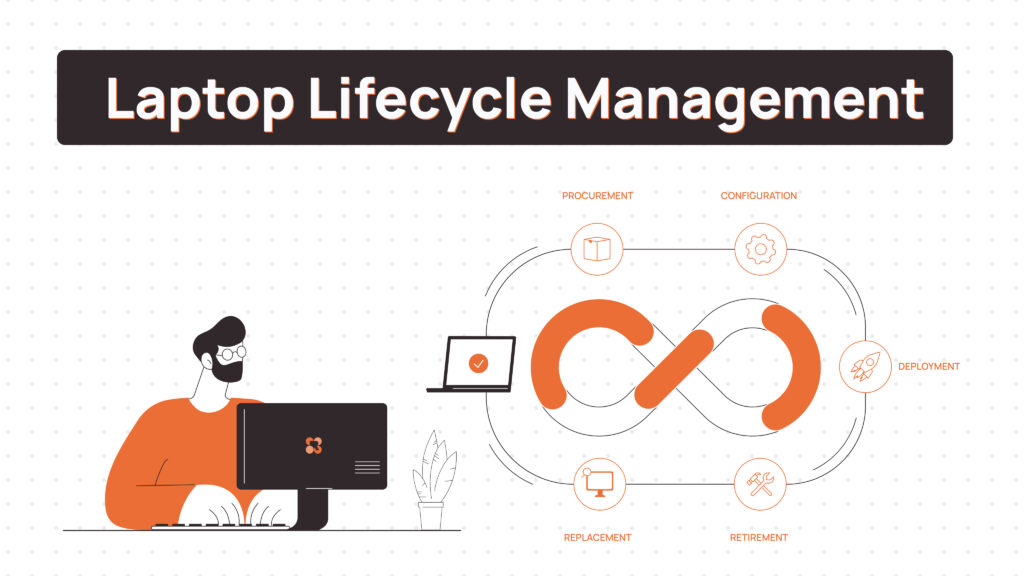
Laptop lifecycle management is the operational system managing devices from procurement through disposal. Not a checklist of stages but a connected workflow where each transition triggers the next.
It is continuous, not linear. Devices retire and feed back into procurement planning. Retrieved laptops get refurbished and redeployed. The system loops.
When it works, devices move smoothly between stages without manual intervention. When it breaks, every transition becomes a coordination project.
Read Also:
- Laptop Asset Management Software: A Practical Buying Guide for IT Leaders
- Best Laptop as a Service (LaaS) Providers in 2026
- Laptop Inventory Management Software
Where Laptop Lifecycle Management Actually Breaks
Those five stages look clean on paper. In practice, each one has specific failure points that compound across the lifecycle. Here is a quick reference before we dig into each:
| Stage | What it covers | Common failure point | Impact if it breaks |
|---|---|---|---|
| Planning | Forecasting device needs and refresh cycles | Disconnected from real-time asset data — spreadsheets show what you bought, not what is deployable | Over-ordering new devices while usable stock sits unknown in storage |
| Procurement | Ordering, standardising, and sourcing devices | Vendor delays with no lead-time buffer; no feedback loop from maintenance on model quality | New hires wait days or weeks; onboarding cost spikes |
| Deployment | Configuration, pre-enrollment, and shipping to employee | Manual per-device setup; wrong configuration profiles; no tracking once shipped | Employees start on personal devices; IT loses visibility immediately |
| Maintenance | Repairs, upgrades, and spare device management | Reactive-only response; no ready replacements; repair SLAs undefined | Days of downtime per incident; productivity loss scales with fleet size |
| Retrieval | Getting devices back on employee departure | No structured process; depends on employee compliance; no escalation path | 30–50% of devices go unreturned; data exposure risk from uncollected devices |
1. Planning
Poor forecasting means you are always reacting. You hire 20 people in Q3 but planned for 8. Now you are buying laptops on short notice at retail prices with no standardisation.
No visibility into current assets compounds the problem. You have devices in storage but cannot quickly determine which ones are functional, configured, or suitable for redeployment. So you buy new ones.
The planning stage fails when it is disconnected from real-time asset data. Spreadsheets updated quarterly do not reflect actual device availability or condition.
2. Procurement
Vendor delays turn into onboarding delays. You order laptops two weeks before start dates. Supply chain issues push delivery by three weeks. New employees wait or use personal devices.
Lack of standardisation creates downstream problems. Different teams order different models. IT cannot stock common parts. Configuration templates multiply. Support complexity increases.
Procurement breaks when there is no systematic connection to deployment timelines and no feedback loop from maintenance on which models actually hold up.
3. Deployment
Late delivery to employees happens when deployment depends on manual coordination. IT receives laptops, manually configures each one, schedules shipping, and tracks delivery separately.
Wrong configurations occur when deployment is not templated. Someone forgets to install VPN software. Someone uses last quarter’s image. The device reaches the employee missing critical tools.
No tracking means devices disappear between stages. You shipped 10 laptops last month but cannot confirm which employees actually received them or when.
4. Maintenance
Reactive fixes are the default when there is no proactive monitoring. Devices fail. Employees report issues. IT troubleshoots. Repairs take days. Productivity stops.
Downtime multiplies when you do not have ready replacements. An employee’s laptop dies. IT orders a replacement. It arrives in a week. Configure it. Ship it. Two weeks of downtime for what should be a same-day swap.
Maintenance fails without connection to inventory and deployment. You cannot quickly ship a configured replacement because you do not have configured devices ready.
5. Retrieval & Decommissioning
Devices not returned is the most visible failure. Employees leave. IT requests the laptop back. Employees ignore it, delay it, or claim they shipped it. The laptop never arrives.
No systematic process means retrieval depends on employee compliance and IT follow-up. Both fail consistently. Industry data consistently puts on-time laptop return rates between 30 and 50 percent — below that threshold, unrecovered devices become a routine write-off rather than an exception. [See Section 06 for a note on the Gartner attribution in the original post.]
Security risks accumulate when devices sit unreturned for months with active credentials and company data. Remote wipe helps but only if the device connects to the network.
Decommissioning breaks when there is no connection back to planning and procurement. Retrieved devices sit in storage indefinitely because nobody is responsible for evaluating them for reuse.
Related Read:
| 📚 Related Read → Device Lifecycle Management: The Complete Guide for Distributed IT Teams (2026) → Laptop Fleet Management: Complete Guide for Modern Remote Teams |
Why Laptop Lifecycle Management Matters for IT Teams
Understanding where lifecycle management breaks reveals why fixing it matters. The impact shows up in four areas that directly affect your bottom line and operational efficiency.
1. Cost control
Unused devices sitting in storage represent sunk capital. Late deliveries mean paying for employees who cannot work. Lost devices are written off at full value. Proper lifecycle management reduces these losses by 20–40%.
2. Asset utilisation
You are paying for more devices than you need because you cannot quickly identify and redeploy existing inventory. Lifecycle management improves utilisation by making redeployment practical.
3. Security
Every unreturned device is a data exposure risk. Every unpatched device is a vulnerability. Every unauthorised configuration is a compliance gap. Lifecycle management closes these gaps through systematic processes.
4. Operational efficiency
IT teams spend hours per week tracking down devices, coordinating shipments, and following up on returns. That is time not spent on strategic work. Automation eliminates this overhead.
| Managing 50+ laptops across distributed teams? Remoasset automates the full lifecycle — procurement, zero-touch deployment, real-time tracking, global retrieval, and certified data wiping — from a single platform across 80+ countries. |
How Long Does a Laptop Last? Lifespan by Use Case
One of the most common questions IT teams face is when to replace devices. The answer depends less on calendar time and more on how the device is being used. Here are realistic business lifespan ranges by role type:
| Use case | Typical lifespan | Key degradation driver | Replacement signal |
|---|---|---|---|
| Standard office / admin work | 4–5 years | Battery capacity, software bloat | Startup time >2 min; battery <3hr |
| Sales and customer-facing roles | 3–4 years | Heavy travel, physical wear | Hinge damage, keyboard failures |
| Engineering and development | 2–3 years | Sustained CPU/RAM load | Thermal throttling, RAM ceiling hit |
| Design and creative production | 2–3 years | GPU and storage intensity | Rendering slowdowns, SSD wear |
| Remote employees (no office swap) | 3–4 years | Inconsistent care standards | Support ticket frequency increase |
The table above is a planning tool, not a warranty. A well-maintained business-grade laptop — ThinkPad, MacBook Pro, Dell Latitude — can exceed these ranges. A consumer-grade device bought to cut upfront cost will typically fall short of them.
Two practical rules: replace by symptom, not by birthday. And when you do replace, evaluate retrieved devices for redeployment to less-demanding roles before writing them off — a developer’s retired 3-year-old ThinkPad is often a capable machine for a new admin hire.
Laptop Lifecycle Management vs IT Asset Management
The terms sound similar but solve different problems. Understanding the distinction helps you evaluate what your organisation actually needs.
| Factor | IT Asset Management | Laptop Lifecycle Management |
|---|---|---|
| Primary Focus | Financial tracking and inventory | Operational workflows and device transitions |
| What It Tracks | Serial numbers, purchase dates, depreciation values, assigned users | Device status, configuration state, deployment readiness, transition history |
| Core Function | Answers “What do we own?” | Answers “What can we deploy right now?” |
| Key Activities | Recording purchases, tracking depreciation, compliance reporting, audit trails | Procurement, deployment, maintenance coordination, retrieval, refurbishment, redeployment |
| Data Type | Static inventory records | Real-time operational status |
| Business Value | Financial accountability and compliance | Reduced downtime, faster onboarding, lower costs through reuse |
| Example Output | “You own 200 laptops, 47 are unassigned” | “Of those 47: 12 are ready for deployment, 18 need reimaging, 17 require repairs” |
| Integration Needs | Finance systems, procurement, compliance tools | HRIS, MDM, ticketing systems, shipping logistics |
| Primary Users | Finance, compliance, procurement | IT operations, help desk, device coordinators |
| Success Metric | Audit readiness, accurate asset records | Time-to-deploy, retrieval rate, device utilisation |
Both are necessary. IT asset management provides the inventory foundation — what exists and who owns it. Lifecycle management handles what happens to it at every transition. The best approach integrates both: asset management tracks ownership while lifecycle management handles transitions.
For a deeper comparison, see: Laptop Asset Management vs Laptop Lifecycle Management: Which Is Right for Remote Teams?
What to Look for in a Laptop Lifecycle Management Solution
Knowing what matters helps you evaluate solutions. When assessing platforms, focus on capabilities that eliminate the coordination gaps causing most failures.
1. End-to-end lifecycle coverage
Handles procurement, deployment, maintenance, retrieval, and redeployment in one platform. Disconnected tools create the coordination gaps that cause failures.
2. Global deployment and retrieval
Global deployment and retrieval capability — ships configured devices to employees anywhere and coordinates returns from any location. Domestic-only solutions do not work for distributed teams.
3. Automation
Triggers workflows automatically based on events like new hire onboarding, employee departure, device age. Manual coordination does not scale.
4. Visibility across stages
Shows real-time status for every device — where it is, who has it, what condition it is in, what is configured on it. Spreadsheets cannot provide this.
5. Security and compliance
Enforces data wiping, tracks chain of custody, maintains audit trails. Essential for regulated industries and remote work environments.
6. Redeployment support
Facilitates device refurbishment and reassignment instead of always buying new. This is where major cost savings happen but most systems ignore it.
How Lifecycle Management Changes for Remote and Global Teams
Remote and distributed teams amplify every lifecycle management challenge. What works for centralised offices breaks entirely when employees span countries and time zones.
1. Cross-border logistics
Shipping laptops internationally requires customs documentation, import duties, regional carrier selection, and local address formats. Domestic shipping workflows do not translate.
2. Distributed workforce
Employees in 15 countries cannot drop devices at a central IT office. Retrieval requires coordinating pickups from remote locations with varying carrier availability and lead times.
3. Coordination complexity
Time zones, languages, local regulations, and regional vendors multiply coordination overhead. What works for 50 employees in one office breaks at 200 employees across 20 countries.
Remote teams need lifecycle management even more than centralised ones, but most systems were built for office environments and retrofitted poorly for distributed work.
| 📚 Related Read → Remote Employee Onboarding: Complete Guide for 2026 → Best Zero-Touch Deployment Software for Windows & Mac (2026) → Laptop Redeployment: How to Reuse Devices Instead of Rebuying |
How Modern Lifecycle Platforms Actually Solve These Problems
The key insight: lifecycle stages are not independent processes. They are connected transitions in a continuous system.
1. Procurement connects to deployment
Order triggers configuration workflow. Devices arrive pre-configured or get automatically queued for imaging. The deployment timeline is visible from the moment the order is placed.
2. Deployment connects to tracking
Assignment automatically updates inventory. Employee receives device, system records it. No manual spreadsheet updates.
3. Maintenance connects to inventory
Device failure triggers replacement from available stock. Broken device is logged for repair. Repaired devices re-enter available inventory automatically.
4. Retrieval connects to redeployment
Employee departure triggers retrieval workflow. Returned device is evaluated, refurbished if needed, and added back to available inventory for next deployment.
This connected approach eliminates the coordination gaps that cause most failures. Information flows automatically between stages. Workflows trigger based on events, not manual intervention.
Platforms like Remoasset handle a full lifecycle and maintain this connectivity. Point solutions handling individual stages cannot.
Best Practices for Laptop Lifecycle Management
The right platform helps, but execution still depends on how you structure your processes. These practices reduce friction across the entire lifecycle.
1. Standardise device models
Limit variety to 2–3 laptop types based on role requirements. Reduces procurement lead times, simplifies configuration, and improves maintenance efficiency.
2. Plan retrieval at deployment
Do not wait until someone leaves to figure out retrieval logistics. Trigger retrieval workflows automatically based on HR system events.
3. Track devices in real-time
Know where every device is, who has it, and what state it is in. Enables quick redeployment and reduces losses.
4. Optimise reuse over replacement
Evaluate retrieved devices for refurbishment and reassignment before buying new. Our laptop redeployment guide covers how to do this systematically. This can reduce procurement costs by 30–50%.
5. Automate transitions
Every manual handoff is a point of failure. Automate workflows between planning, procurement, zero-touch deployment, maintenance, and retrieval. The less that depends on someone remembering to do something, the more consistently the lifecycle works.
6. Use lifecycle data to plan refreshes
Track device age, repair frequency, and battery health centrally. Use that data to forecast refresh cycles 6–12 months ahead rather than reacting when devices fail. A laptop inventory management software layer is what makes this possible at scale.
Centralise Your Laptop Lifecycle with Remoasset
Laptop lifecycle management is not complicated in theory. The stages are straightforward. The benefits are clear. The challenge is execution.
Most companies fail because they treat each stage as a separate process. Procurement happens in one system. Deployment in another. Tracking in spreadsheets. Retrieval through email. Each handoff is a coordination point where things break.
Remoasset connects these stages into one operational system. Procurement triggers deployment automatically. Departures trigger retrieval globally across 80+ countries. Retrieved devices are refurbished and redeployed — not written off. If you are managing 100+ devices across distributed teams, Remoasset eliminates the manual coordination causing most lifecycle failures.
| 📚 Related Read → Bulk Laptop Retirement: A Complete Guide for Remote Teams → Laptop Asset Management Software: A Practical Buying Guide for IT Leaders |
FAQs
What is laptop lifecycle management?
Laptop lifecycle management is the operational system managing devices from procurement through disposal, including deployment, maintenance, retrieval, and redeployment. It is focused on device transitions and workflows rather than just inventory tracking.
What are the stages of laptop lifecycle management?
The five stages are planning (forecasting needs), procurement (ordering devices), deployment (configuring and delivering to employees), maintenance (repairs and upgrades), and retrieval and decommissioning (recovering devices and either reusing or disposing securely).
How is laptop lifecycle management different from IT asset management?
IT asset management tracks inventory and financial data — what you own, where it is, depreciation value. Laptop lifecycle management handles operational workflows — getting devices to employees, maintaining them, retrieving them, and deciding reuse versus replacement.
Why do companies struggle with laptop lifecycle management?
Most failures happen between stages, not within them. Coordination gaps cause delays, lost devices, and inefficiencies. Companies treat stages as independent processes instead of connected workflows, leading to manual coordination that does not scale.
How can laptop lifecycle management be improved?
Use platforms that connect all stages in one system with automated workflows. Integrate with HR systems to trigger deployments and retrievals automatically. Standardise device models and configurations. Track devices in real-time. Build redeployment into the process instead of always buying new.
How long is a laptop lifecycle for a business?
The full device lifecycle — from purchase order to secure disposal — typically spans 3 to 5 years for most business roles, though the range varies by use case. Standard office use: 4–5 years. Sales and field roles: 3–4 years. Engineering and design: 2–3 years. The lifecycle does not end at retirement — devices that are retrieved, wiped, and refurbished often re-enter the fleet for a second deployment cycle in a less demanding role, extending total useful life further.
When should a company replace its laptops?
Replace by symptom rather than by age alone. Key signals: battery life falls below 3 hours of active use, startup time exceeds two minutes consistently, the device cannot run current OS security updates, hardware repair frequency increases, or the device no longer supports required software. From a planning perspective, build a rolling refresh cycle based on fleet data — devices entering their fourth year should be flagged for assessment rather than waiting for them to fail in an employee’s hands.
What is the average laptop lifecycle for business use?
Across business fleets, three to four years is the most common replacement cycle, but average hides a wide range. Consumer-grade laptops purchased to reduce upfront cost often need replacing in 2–3 years. Business-grade models (ThinkPad, MacBook Pro, Dell Latitude, HP EliteBook) regularly reach 4–5 years with proper maintenance. The more meaningful metric for IT planning is cost per productive day — a $1,200 laptop lasting 4 years costs less per day than an $800 laptop replaced after 2 years, and generates less procurement, configuration, and disposal overhead.
How do I track laptops in my organisation?
Tracking at scale requires three layers: inventory records (which devices exist, who owns them, purchase date and warranty), real-time status (where the device is, whether it is deployed, in storage, in repair, or in transit), and configuration state (what OS version, MDM enrollment status, encryption state). Spreadsheets can cover the first layer for small teams but break at the second and third. Dedicated lifecycle platforms maintain all three layers in real time, updating automatically when devices move between employees, repair queues, or storage — without requiring anyone to manually log the change.




































































