Managing laptop returns in a remote or hybrid setup is harder than it looks. According to Capterra, 71% of organizations report at least one departing employee failing to return company equipment. Devices sit across cities, employees delay handovers, and teams keep reaching out manually. A structured laptop retrieval process helps recover assets on time, reduce data risk, and keep inventory accurate.
This guide explains how a laptop retrieval process works, when companies need it, and how to run it at scale for distributed teams.
When laptop retrieval process becomes necessary
A Ponemon-Intel study found that 42% of business devices are lost offsite. This highlights the seriousness of a laptop retrieval process. This gap appears the moment an employee exits, a contract ends, or a device is reassigned. In each case, the organization’s relationship with the device changes immediately, but the device itself remains outside company control. In remote environments, this is where most asset and data risks originate.
1. Employee exits and offboarding events
The most common trigger for retrieval is employee resignation, termination, or sudden exit. At this point, access rights change instantly, but the physical device often remains active and connected. If retrieval is not initiated directly from the offboarding workflow, IT teams rely on outdated addresses, manual follow-ups, and incomplete asset records.
2. Contract completion and short-term workforce exits
Internships, contractor roles, and project-based hires introduce a different risk pattern. These exits are frequent, predictable, and often high volume. When a laptop retrieval process is not automated for these events, devices accumulate outside custody and recovery rates drop sharply. At scale, short-term exits become the largest source of unrecovered assets.
3. Role changes and device reassignment
Role changes, upgrades, and team transfers require devices to be returned, inspected, and reassigned. When these transitions are handled informally, devices move between employees without inspection, inventory updates, or data controls.
4. Long inactivity and unresponsive employees
Devices that remain inactive for long periods present a hidden risk. These are often forgotten assets with no recent check-ins, outdated owners, and unclear custody. By the time retrieval is attempted, employees may have relocated or disengaged. Inactive devices are the most likely to become permanent write-offs.
Why a delayed laptop retrieval process creates operational risk
Once custody should change, three risks escalate in parallel.
- Loss of location visibility
- Rising data exposure
- Declining enforceability
At a small scale, these failures appear isolated. At an organizational scale, they compound into inventory drift, audit gaps, and compliance menace. Laptop retrieval becomes necessary not when the device is lost, but when control is first at risk.
What a proper laptop retrieval process looks like
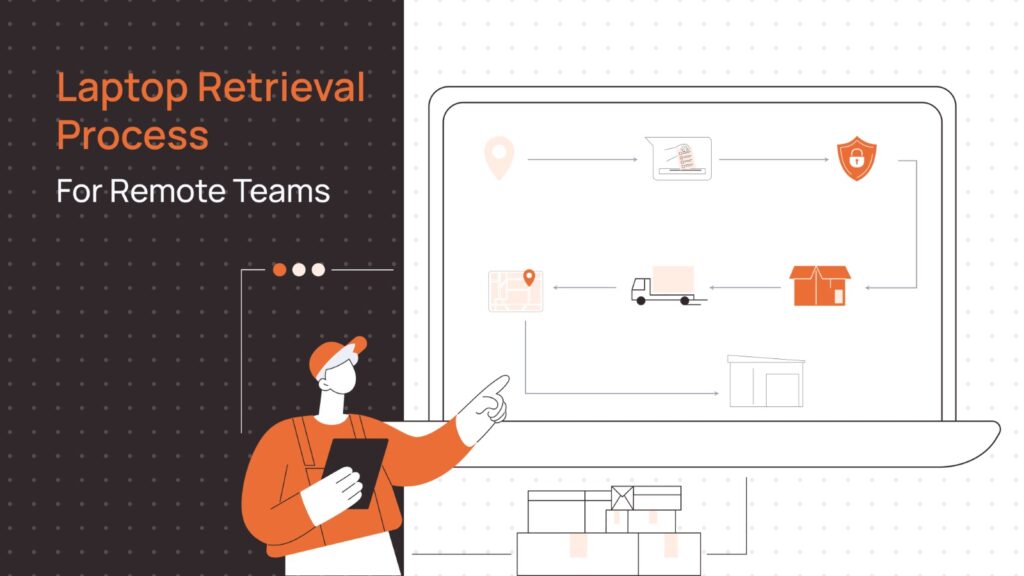
A reliable retrieval process is designed to reduce three risks: asset loss, data exposure, and operational delays. It works as a controlled workflow with minimum changes across the board.
Step 1: Initiate the retrieval request
IT teams often work with incomplete or outdated data. Serial numbers may be missing, asset ownership may be unclear, and employee location data may no longer be accurate. A structured initiation workflow should begin from system records.
It should capture the employee’s exit status, verified asset identity, current location, and return timeline. This creates a single source of truth before any coordination begins. When initiation is weak, every downstream step becomes unreliable.
Step 2: Coordinate with the employee
Employee coordination is the highest failure point in laptop retrieval. After exit confirmation, employees may delay responses, provide incorrect addresses, or repeatedly reschedule pickups.
Effective coordination requires structured communication with clear instructions, defined timelines, and automated reminders. Multiple communication channels reduce dependency on any single point of failure. Automation at this stage increases recovery rates.
Step 3: Arrange packaging and pickup
Improper packaging is one of the most common causes of transit damage and post-retrieval disputes. Remote employees often ship devices without adequate padding, omit accessories, or use unsealed boxes. When damage is discovered on receipt, liability becomes unclear and insurance claims become difficult to pursue.
A controlled process of laptop retrieval, which provides standardized, tamper-evident packaging protects the physical asset. Good packaging is not a logistics detail. It is a risk control.
Step 4: Track the shipment
Once the device leaves the employee, custody risk increases sharply. Without structured tracking, IT teams lose visibility into whether the pickup occurred, and whether delivery timelines are being breached. Lost tracking links and delayed updates create blind spots that delay offboarding closure.
A proper setup ties every shipment to a specific asset record, provides real-time status updates, and triggers automatic alerts for missed pickups or stalled returns. This allows teams to intervene before delays turn into losses.
Step 5: Receive and inspect the device
Physical receipt alone does not complete retrieval. Without inspection, teams miss undocumented damage, and missing accessories. Over time, these gaps create inventory inaccuracies and audit discrepancies.
Inspection should verify the serial number and asset tag, assess physical condition, and reconcile accessories. This should be followed by immediately updating asset status in the system. This step closes the custody loop and restores inventory accuracy.
Step 6: Secure data handling
Returned laptops often contain cached credentials, active sessions, and locally stored confidential files. If these are not addressed, the organization remains exposed even after physical recovery.
Secure handling includes remote locking or wiping before pickup when required, certified data sanitization, and formal clearance before redeployment or storage. This ensures retrieval does not introduce compliance or breach risk at the final stage of the lifecycle.
Common challenges companies face in laptop retrieval process
Laptop retrieval fails not because teams ignore it, but because it cuts across four systems at once: identity, asset records, logistics, and security. In remote environments, even small control gaps cascade into structural failures.
1. Breakdown of location and custody visibility after exit
The first failure usually occurs in identity-to-asset mapping. When an employee exits, HR systems update immediately, but asset systems fall behind. Device ownership is still mapped to inactive users.
This creates a state where the organization cannot answer a basic question: Which active device is with which inactive user, at which verified location. Without this mapping, retrieval requests stall at initiation.
2. Coordination failures in offboarding workflows
Laptop retrieval depends on synchronized execution across HR, IT, and the employee. In practice, offboarding workflows often lack a deterministic retrieval trigger. Notifications are manual, ownership of follow-ups is unclear, and responsibility shifts between teams.
This creates a technical failure mode where retrieval is initiated. Delays accumulate, state transitions are not recorded, and recovery probability drops with each missed SLA. Over time, this becomes the dominant source of unrecovered assets.
3. Loss of chain-of-custody during transit
Once the device leaves the employee, custody control moves outside internal systems. Most courier workflows track parcels, not assets. Tracking IDs are not mapped to serial numbers, and handover timestamps are not recorded at the asset level.
This creates a gap where the organization knows a parcel is moving, but does not know the state of a specific device. In this window, damage, swaps, or loss cannot be reliably attributed or proven.
4. Structural limits of courier-based tracking
Standard logistics systems are designed to optimize delivery success. They track parcels, not devices, and treat every shipment as an isolated transaction. As a result, state changes at the asset level are not recorded. This means custody transitions are not auditable, and service levels are not enforced against offboarding timelines.
When a shipment is delayed, IT teams cannot determine whether the device is misrouted, or lost entirely. Tracking may exist, but operational control does not.
5. Persistent data exposure during custody gaps
Data risk escalates when identity deprovisioning and physical recovery are not synchronized. Even after central access is revoked, devices often retain cached authentication tokens, offline credentials, and locally stored regulated data. During transit, these devices exist outside any enforceable security boundary.
If a device is delayed or lost without pre-pickup locking or encryption, the organization faces a reportable data exposure risk alongside an asset loss. At this point, retrieval failure crosses from operations into compliance and legal risk.
6. Inventory corruption after physical receipt
Many retrieval failures occur after the device has already returned. Without automated reconciliation between physical inspection and asset systems, records drift from reality. Devices remain marked active, serial numbers are reused or duplicated, and availability states become unreliable.
This corrupts procurement planning, weakens audit integrity, and distorts capacity forecasts for new hires. Over time, inventory corruption becomes harder to detect than asset loss itself, because the system appears complete while accuracy steadily degrades.
Best practices for secure and smooth retrieval
Even with a retrieval service in place, most failures come from weak internal processes. The objective is not only to recover the device, but to protect data, maintain custody, and close the asset lifecycle without friction.
1. Start the laptop retrieval process as part of formal offboarding
Late initiation is the most common cause of asset loss. When retrieval is triggered only on the last working day, there is no buffer for rescheduling. Initiating retrieval as soon as the exit is confirmed allows address validation,early packaging, and automated reminders.
2. Reduce employee effort to increase return success
Return friction directly drives return failure. When employees must arrange packaging, book couriers, or pay shipping upfront, delays multiply and recovery rates drop. Providing ready-to-use packaging, prepaid labels, and scheduled pickups makes it far easier for remote first teams.
3. Maintain end-to-end shipment visibility
Custody risk increases the moment the device leaves the employee. Without asset-linked tracking and real-time status updates, IT teams lose the ability to intervene when pickups fail or shipments stall. Continuous visibility turns retrieval from guesswork into an enforceable workflow.
4. Enforce security controls before and during transit
Data exposure is the highest-impact retrieval risk. Until access is revoked and the device is secured, credentials and local data remain exploitable. Locking or encrypting devices before pickup and enforcing secure handling in transit prevents data failures events.
5. Standardize inspection and inventory reconciliation
Physical receipt does not complete retrieval unless systems are updated. Without serial verification, and immediate inventory reconciliation, records drift from reality. Structured inspection closes the custody loop and restores inventory accuracy.
6. Prepare for non-returned and disputed assets
Not all retrievals succeed, and unmanaged failures create financial and audit risk. High-maturity teams define reminder sequences, escalation paths, recovery policies, and formal write-offs in advance. Clear recovery rules prevent ambiguity and protect finance and compliance functions.
7. Design retrieval workflows to scale across locations
Manual retrieval works only at a small scale. As teams spread across cities, inconsistent vendors, fragmented reporting, and ad hoc processes become structural bottlenecks. Standardized workflows and automation are required to keep retrieval predictable as headcount grows.
In-house vs outsourced laptop retrieval process: What should you choose?
Choosing between in-house and outsourced laptop retrieval is not a cost decision. It is a decision about scale, operational control, and risk exposure as your organization grows. Here are a few situations to help you decide better.
In-House vs Outsourced IT Asset Retrieval: Decision Framework
Evaluate when to manage device retrieval internally and when to transition to a governed outsourced model.
In-House vs Outsourced Asset Retrieval
A structured decision framework for growing organizations.
| Organization Stage | Typical Situation | In-House Handling | Outsourced Handling | Best Decision |
|---|---|---|---|---|
| Small team, single city | Limited device movement, office-based handovers, low monthly exits | Manual tracking, direct courier bookings, informal coordination | Adds overhead without much benefit | In-house is sufficient |
| Growing remote or hybrid team | Cross-city exits, parallel offboarding, inconsistent courier reliability | Breaks due to manual follow-ups and poor visibility | Tracking, SLAs, standardized execution | Transition to outsourced |
| Distributed teams at scale | Multi-city workforce, high joiner/leaver volume, audit pressure | Not viable due to scale and reporting gaps | Governed workflows, dashboards, audit-ready controls | Outsourced is necessary |
| Low operational risk | Few locations, low device volume, minimal compliance exposure | Manageable with disciplined internal process | Often unnecessary | In-house preferred |
| High operational risk | Frequent movement, sensitive data, tight redeployment cycles | Asset loss, audit gaps, security incidents | Risk reduction through automation & governance | Outsourced preferred |
What to look for in a laptop retrieval service provider
IT and Ops teams should evaluate providers on:
1. Reach and reliability
The first question any IT leader must answer is whether the provider can reliably reach their workforce. In remote organizations, employees are spread across metros, tier 2 cities, temporary residences, and frequently changing addresses. A provider that only performs well in core cities will fail in edge cases.
Decision-makers should look for a partner that can execute pickups consistently across regions, and handle address changes without friction. They should be able to maintain service levels even in low-density locations. If reach is unreliable, every other capability becomes irrelevant.
2. Visibility and control
Retrieval only works when IT teams retain control after the device leaves the employee. Leaders should evaluate whether the provider offers continuous visibility from request to receipt.
This includes knowing when a pickup is scheduled, whether it actually happened, where the device is in transit, and when it is received. More importantly, this visibility must be tied to specific asset records, not just courier tracking links.
3. Security and data protection
At its core, a laptop retrieval process is a data security process. Every returned device contains company credentials, cached sessions, and sensitive files until it is properly secured and wiped. If a device is lost or delayed without protection, the organization faces data exposure, not just asset loss.
Decision-makers should assess whether the provider supports access revocation, device locking where required, secure handling in transit, and certified wiping after receipt. Providers that treat it as security reduce enterprise exposure.
4. Process integration and predictability
Finally, retrieval must fit into existing IT operations. Strong providers integrate with offboarding workflows, asset management systems, and audit reporting. Weak providers operate in isolation and push reconciliation work back onto internal teams.
Leaders should look for clear SLAs, predictable turnaround times, structured inspection reports, and automated inventory updates. The goal is predictable recovery, accurate records, and low operational overhead.
How Remoasset handles your laptop retrieval process
Remoasset designs laptop retrieval processes around four core principles: centralized control, operational visibility, security by design, and lifecycle integration. Together, these turn retrieval from a logistics task into a governed IT process.
1. Centralized control from the first request
Remoasset starts retrieval from system data. IT and HR teams initiate retrievals from a centralized platform that contains employee records, asset assignments, and offboarding status. This ensures every retrieval is tied to a verified device, a known owner, and a valid exit workflow.
By eliminating manual data entry and disconnected requests, Remoasset reduces the most common causes of retrieval failure: incorrect asset identity, outdated addresses, and unclear ownership.
2. End-to-end operational visibility
Once retrieval is initiated, Remoasset tracks every retrieval against a specific asset record, from scheduling to pickup, transit, and receipt. IT teams always know whether a device has been scheduled, whether it has left the employee, where it is in transit, and when it is received. Retrieval becomes a measurable, auditable workflow.
3. Security built into every stage
Retrieval should be treated as a data security process. Devices can be secured before pickup, access can be revoked as part of offboarding, and sanitization is enforced after receipt before redeployment or storage. Inspection ensures that tampering, damage, or missing accessories are documented immediately.
This reduces the highest-impact risk in retrieval: uncontrolled data exposure during and after employee exits.
4. Lifecycle integration, not vendor dependency
What differentiates Remoasset is that it is integrated into the same platform that manages onboarding, device assignment, and refresh cycles. Every retrieval automatically updates inventory, availability, and audit records without manual reconciliation.
For IT and Ops teams, this delivers predictable recovery, accurate inventory at all times, and lower operational overhead. Retrieval becomes a natural part of the device lifecycle, not an operational exception.
Start the laptop retrieval process for your organization
If your organization manages devices across locations, retrieval should not depend on emails, spreadsheets, and manual follow-ups.
With Remoasset, teams can initiate retrievals from a single dashboard, track every device until it is safely received, and maintain accurate, audit-ready records without additional overhead.
For remote-first teams, retrieval becomes a controlled IT process, not an operational risk. Talk to the Remoasset team to set up a structured laptop retrieval process for your distributed workforce.
Frequently asked questions
How long does laptop retrieval usually take?
Within the same city, pickup and delivery typically completes in 3 to 5 business days. Cross-city retrievals may take 5 to 10 days depending on location.
What happens if an employee does not return the laptop?
Retrieval workflows include reminders, escalation paths, and documentation to support HR follow-up if required. The organization may or may not decide to go legal, depending on the case.
Is data safe during transit?
Devices can be locked, encrypted, or remotely wiped before pickup. Packaging and handling follow secure transport practices. This should be standard procedure.
Can retrievals be done across multiple cities?
Yes. Retrieval services are designed for distributed teams across metros and tier 2 cities, all over the world.
What about damaged or missing devices?
Inspection reports document conditions on arrival. Missing or damaged assets are flagged for recovery or replacement workflows.
Is retrieval integrated with asset tracking?
Yes. Each retrieval updates device status, location, and availability in the asset management system.