Providing equipment for remote workers is now a mission critical operational task. As remote and hybrid teams grow, companies must supply devices and peripherals reliably, securely and at scale. Manual procurement and shipping cause onboarding delays, lost productivity and compliance risk. In 2026, organisations that automate device sourcing, provisioning and tracking gain faster time to productivity and lower total cost of ownership.
A report by the Workspace ONE Blog states that 74% percent of IT and HR leaders report that device delays negatively affect new hire productivity.
In this guide you will learn what equipment to provide by role, how to source and deploy devices across global teams, what a modern provisioning process looks like, buy versus lease tradeoffs, policies to reduce legal and financial risk, and how automation prevents onboarding delays and lost assets. The guide concludes with concrete ways RemoAsset helps organisations deliver zero touch provisioning, global sourcing and real time tracking.
What Equipment Do Remote Workers Need?
Equipment needs vary by role, seniority and local working conditions. Below are core categories to standardise across your organisation.
1. Core work devices
Laptop or workstation with corporate build and management agent.
External monitor for knowledge workers and designers.
Docking or USB hub for multi monitor setups.
Related Read: How to Provide Laptops for Remote Employees
2. Peripherals
Headset with noise cancellation for calls and meetings.
External keyboard and mouse for ergonomic comfort.
Webcam if laptop camera quality is low.
Portable power bank for some field roles.
3. Security and connectivity
VPN client and corporate endpoint agent preinstalled.
Encrypted external drives where local storage is required.
Mobile hotspot or 4G/5G device in regions with unreliable internet.
4. Ergonomics and wellbeing
Laptop riser, external keyboard tray, or an ergonomic chair stipend when the role requires long hours.
Footrests, monitor arms and laptop stands for hybrid setups.
5. Role-specific extras
Designers need colour calibrated monitors and graphic tablets.
Developers may require additional RAM or dedicated GPUs.
Field sales teams might need ruggedised devices and portable POS hardware.
Tip: create pre-approved equipment bundles by role. Bundles reduce decision friction, ensure compliance with company standards and simplify warranty support.
Challenges in Providing Equipment for Remote Workers
Delivering devices to remote employees is deceptively complex. Common pain points include:
- Slow onboarding caused by procurement and shipping delays. Delays mean new hires cannot start full work on day one. Studies show remote employee onboarding performs worse than hybrid and in person, which reinforces the need for reliable provisioning.
- Lost devices and zero visibility after delivery. Once a package is delivered, many organisations lack a tight feedback loop to confirm device activation and agent check in.
- Warranty and maintenance friction across geographies. Warranty terms, service centres and replacement logistics differ by country.
- Security and compliance gaps without standardised hardware and configuration. Uncontrolled personal devices increase attack surface and add complexity for audits.
- Manual ticket churn for IT teams. Manual imaging, shipping coordination and support tickets consume engineering time and delay scale.
Automation solves the most painful parts of this workflow. A central platform can automate sourcing, zero touch provisioning, real time tracking and retrieval so IT teams focus on policies and exceptions, not logistics. For organisations prioritising employee experience, a managed device program reduces digital friction and improves productivity.
What Should a Device Provisioning Process Look Like?
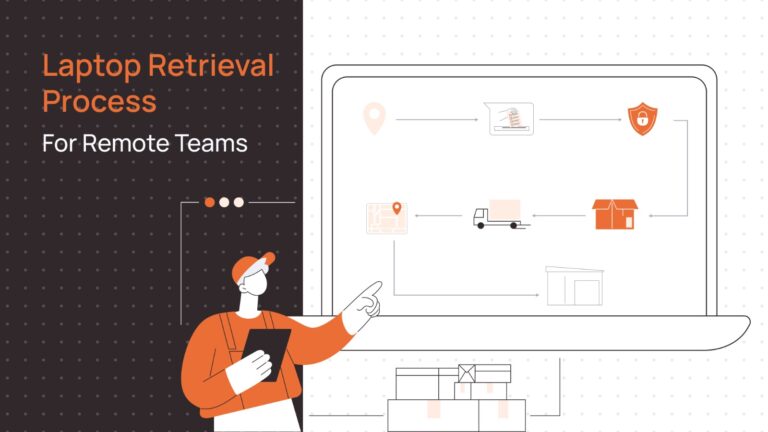
A reliable provisioning process is repeatable, auditable and automated. Below is a high level workflow you can implement.
- Procurement:
Use approved vendors or an internal catalogue.
Support local sourcing in high cost or high customs risk regions. - Configuration and Security Setup:
Apply corporate image and security agent.
Enforce disk encryption, endpoint protection and VPN configuration.
Use zero touch provisioning where possible so devices enroll automatically on first boot. - Delivery and Tracking:
Ship with prepaid labels and tamper evident packaging.
Provide real time tracking to IT and the new hire.
Confirm device check in through a management agent or an activation ping. - Monitoring During Employment:
Track device health, warranty, and software posture.
Automate patching and alerting for compliance drift. - Secure Offboarding and Retrieval:
Trigger pickup workflows on employee exit.
Verify data wipe, chain of custody and redeployment or certified disposal.
Design processes so each stage generates an auditable log. These logs are useful for compliance, finance and IT forecasting.
Best Ways to Provide Equipment to Remote Workers
Choose a delivery model that balances cost, speed and control. Use the approaches below alone or in combination.
Local sourcing to avoid customs delays
Procure devices from local distributors to reduce import taxes and shipping uncertainty. Local warranties and service centres improve time to repair and replacement.
Pre-approved catalogues for consistency
Offer role based catalogues with tiered options. Pre-approval avoids ad hoc purchases and simplifies support and replacement policies.
Zero touch deployment for IT-ready arrival
Zero touch provisioning removes manual imaging. Devices arrive IT ready and policies apply on first boot. Growing market investment in zero touch provisioning shows that automation is a strategic priority for device management.
Centralised asset tracking and lifecycle management
Manage procurement, onboarding, monitoring and offboarding in one system. Centralisation improves visibility, prevents orphaned devices and drives cost recovery.
Provide flexible options for employees
Offer choice when appropriate: ship corporate devices, provide a stipend, or allow approved BYOD with strict configuration rules. Document the tradeoffs.
Make retrieval and recovery standard operating procedure
Plan for returns at hire or exit. Prepaid return kits and scheduled pickups reduce lost devices and help maintain inventory accuracy.
RemoAsset capability note: Local procurement in multiple countries and zero touch delivery reduce setup time, reduce customs exposure and speed new hire productivity.
Buy vs Lease Equipment for Remote Workers
Choosing whether to buy or lease depends on cashflow, refresh cycles and scale. The table below summarises pros and cons and suggested use cases.
| Model | Pros | Cons | Best for |
|---|---|---|---|
| Buy (CapEx) | Full ownership, higher resale potential, no ongoing fees | Upfront capital, depreciation risk, inventory overhead | Small teams with predictable growth and long refresh cycles |
| Lease (OpEx) | Lower upfront cost, predictable monthly expense, easier global logistics | Total cost may be higher, contractual obligations | Fast scaling companies, short refresh cycles, global teams |
| Rental / Short-term | Immediate availability, ideal for temporary hires | Higher unit cost over time | Contract workers, events, temporary projects |
| Stipend / BYOD | Minimal logistics cost | Reduced control, security and compliance risk | Non critical roles or where employees prefer flexibility |
RemoAsset supports both purchase and leasing models. Leasing or rental programs are particularly useful for companies scaling quickly across regions because they solve local supply and warranty issues while preserving cashflow.
Policies for Remote Hardware Usage
Clear policies reduce disputes, legal exposure and cost leakage. Your policy should cover:
Ownership and stipend rules
Clarify whether devices remain company property, the employee responsibilities and tax implications.
Return and retrieval expectations
Define timelines for device return on exit and the process for failed returns.
Damage and loss protocols
Specify when employees contribute to repair or replacement costs.
Security and acceptable use
Require disk encryption, mandatory agents and prohibited software.
Warranty and maintenance procedures
Explain how to raise repair tickets and the expected SLAs.
Provide a downloadable template for legal and HR review. A well written policy aligns employee expectations and reduces legal disputes.
Automation for Remote Equipment Provisioning
Automation turns a fragile logistics problem into a repeatable program. Key automation flows to implement:
HRIS triggered procurement
When HR marks a hire, an automated purchase order is created and a device is reserved from inventory.
Auto enroll on first boot
Zero touch provisioning ensures devices install corporate policies automatically on activation.
Stock thresholds and predictive replenishment
When laptop stock falls below threshold, procurement triggers automatically so IT never runs out.
Automated pickups for offboarding
Offboarding events create retrieval tickets, print return labels and schedule carrier pickups.
Automated compliance checks
Regular automated audits report encryption status, agent health and warranty expiry.
Automation reduces manual tickets, accelerates onboarding and improves audit readiness. The zero touch provisioning market is expanding rapidly, reflecting enterprise demand for these capabilities.
RemoAsset automation reduces IT workload, eliminates manual errors and ensures consistent compliance across regions.
Providing Equipment Globally? Key Considerations
Global delivery introduces complexity. Consider these issues.
Customs and duties
Import duties and customs clearance can add cost and delay. Local sourcing or warehousing often reduces total landed cost.
Warranty differences and service centres
Some manufacturers limit warranty coverage by region. Local procurement improves the chance of on site repairs and reduces cross border returns.
Carrier reliability and local logistics partners
Choose carriers with proven last mile reliability in each target country. Local carrier performance often varies dramatically.
Local compliance and tax rules
Equipment provided to employees may be taxable in some jurisdictions. Consult payroll and legal teams to define stipend or benefit policy.
Local inventory and consolidation hubs
Use regional hubs to aggregate shipments and reduce international parcels. Consolidation lowers freight cost and improves predictability.
RemoAsset local procurement and regional consolidation reduce customs friction, lower costs and simplify warranty management.
Deliver a Better Remote Employee Experience with Real Examples
A few practical interventions that deliver immediate results:
Day-one activation guarantee
Guarantee device activation on day one by combining zero touch images and courier notifications.
Pack a welcome kit
Include setup guides, contact for IT support and ergonomic advice to reduce early friction.
Offer choice with guardrails
Let employees choose from two approved bundles to satisfy personal preferences while maintaining security.
Provide clear return labels and instructions
Prepaid returns reduce lost hardware and increase return rates.
Companies that treat device provisioning as part of employee experience measure higher productivity and retention. Ivanti research shows that a strong digital employee experience positively affects productivity, satisfaction and retention.
Implementation Roadmap: From Pilot to Global Program
Pilot small
Start with a single region and one role. Validate procurement vendors, imaging and zero touch enrolment.
Define bundles and policies
Create role based catalogues and a standard policy for ownership and returns.
Automate HRIS triggers
Integrate procurement with HR systems so device requests and procurement are automatic.
Set up regional hubs
Use local warehouses in major regions to lower customs and speed delivery.
Measure and iterate
Track metrics such as days to activation, device loss rate, cost per onboarding and employee satisfaction. Use these metrics to tune processes.
Scale globally
Roll the program to other regions once SLAs and local vendors are validated.
Metrics to Track for Success
To run an effective program measure and report on:
- Days from hire to device activation.
- Percentage of hires with devices active on day one.
- Device loss or theft rate.
- Cost per onboarding including logistics and provisioning.
- Residual value recovered through resale or redeployment.
- Digital employee experience scores related to device quality and setup.
- Use dashboards that combine procurement, asset inventory and endpoint telemetry so you have one source of truth for device lifecycle metrics.
Why Choose RemoAsset for Remote Worker Equipment in 2026
RemoAsset is built for the operational realities of distributed teams. Key differentiators:
Centralised procurement and local sourcing
RemoAsset maintains vendor relationships across regions to avoid customs delays and provide local warranty coverage.
Zero touch provisioning at scale
Devices arrive IT ready. Employees sign in and policies apply automatically. This reduces IT imaging work and improves day-one productivity.
Real time tracking and lifecycle management
Every device shows status from order to activation to retrieval. The single dashboard reduces orphaned devices and improves audit readiness.
Automated offboarding and retrieval
Prepaid return kits and scheduled pickups reduce lost hardware and recover residual value.
Support for leasing and purchase models
RemoAsset helps teams choose a model that fits cashflow and refreshes cadence while managing logistics.
Compliance and security by design
Devices arrive configured with encryption and endpoint protection. Offboarding includes certified data wiping or secure reuse.
In short, RemoAsset turns device provisioning into an operational advantage rather than a recurring headache.
People Also Ask
What equipment is needed for remote work?
At minimum a company standard laptop, headphones, and a reliable internet connection. Role specific equipment may include additional monitors, peripherals and secure connectivity options.
Which companies offer equipment for remote work?
Many hardware vendors and managed service companies offer programs for remote employee equipment. RemoAsset is an example of a platform that combines procurement, zero touch provisioning and global logistics.
How do businesses track remote employee equipment?
Use a central asset management platform that ties procurement records to device serial numbers, endpoint telemetry and offboarding workflows.
How do you manage global equipment delivery to remote teams?
Use local procurement locations, consolidation hubs, trusted carriers and pre approved vendors. Factor in customs, warranty and local tax rules up front.
Providing equipment for remote workers is an operational challenge with direct impact on productivity, security and cost. Organisations that standardise device bundles, automate procurement and use zero touch provisioning will reduce time to impact for new hires, recover more value on refresh and lower compliance risk.
If your team is scaling globally and needs a predictable, compliant and auditable device program, RemoAsset provides centralized procurement, zero touch delivery, real time tracking and automated retrieval. Book a demo to see how you can equip workers anywhere instantly and transform device provisioning from a liability into a business advantage.
Book a demo with RemoAsset to streamline global procurement, enable zero touch provisioning and track devices in real time.